LightSwitch: From Download to a Cloud App in 55 Minutes
You've probably heard about the uproar from professional developers about Microsoft's new direction of catering to amateurs with low-end tools like WebMatrix and Visual Studio LightSwitch, designed for quickly building data-centric apps without that pesky code-writing thing.
Some people complain that Microsoft is promoting poor programming practices; some complain that it devalues their jobs and leads to impossible expectations ("Joe in Finance did this in an hour, why can't you just flesh it out into a companywide app by the end of the day?"); some apparently just don't like opening up software development to the great unwashed masses.
From what I've read, it seems like WebMatrix is targeted to hobbyists or techies just looking to experiment with programming , possibly leading to more advanced coding and escalation of skills, while LightSwitch is designed to let non-programmers quickly get small business apps going for single or small group use.
Or, as Eric Nelson wrote in an MSDN blog: "LightSwitch is targeted at business developers and power users creating custom LOB applications leveraging data from multiple sources that can be easily deployed to the desktop or cloud."
I could fake being a business developer or power user, so I decided to find out just how easy it is to build a LightSwitch data-centric app, using a SQL Azure database in the cloud.
I started from scratch, downloading LightSwitch, installing it and building the app. The timeline went something like this:
- 11:15 -- Search for LightSwitch; download it.
- 11:31 -- Begin installation.
- 11:47 -- Setup Complete, Thank You For Installing, Run The Product Now.
- 11:48 -- Restart required to finish installation (?) but installation doesn't continue after restart.
- 11:53 -- Start building an app, roughly following a tutorial.
- 11:59 -- Connect to my SQL Azure database.
- 12:10 -- Display a query-based "screen" that lets me add, edit and delete records. Like this:
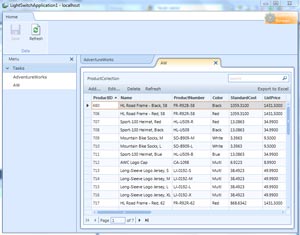 |
| Figure 1. A LightSwitch query-based 'screen' showing a SQL Azure database. [Click image for larger view.] |
So, in less than an hour, with no LightSwitch experience whatsoever, I was looking at a customized pseudo-app in Visual Studio. (Of course, that doesn't include 45 minutes or so of fumbling around because I couldn't find any LightSwitch new project templates in VS until it finally dawned on me I had to target .NET 4 instead of 3.5, but that's just my usual inept Ramel-specific experience that other people don't have to go through).
Deployment is a whole other issue, and seems to be a little buggy in this beta. I couldn't get a "three-tier" app running on my hosted server with msdeploy.exe, but a less ambitious "two-tier" desktop app was easy to get going on localhost.
So the tool seems to do the job it was designed for and should get even better in final release.
I've also been tinkering with the WebMatrix beta. It has required more coding from me, but that's because I've been attempting far more complex experiments with PHP, Odata, SQL Azure and the like.
But it too seems to fulfill its promise. It combines low-end versions of IIS (Developer Express) and SQL Server (Compact, or embedded) with the ASP.NET framework that make it easy to get data-centric Web apps up and running. It provides many templates for common technologies such as WordPress, DotNetNuke, Joomla! and more. And deployment worked out much better. It has a simple "Web Deploy" (apparently a packaged msdeploy.exe) feature that allowed me to get some apps up and running on one of the suggested hosts, Applied Innovations (great service from these guys!).
I like fooling around with these tools. Quite simply, some .NET concepts (covariance, contravariance, anyone?) are beyond me and will never be mastered. The framework is just too complex. It's frustrating to muck around in C# and know there are ways to do what I want to do, but it takes endless hours of searching and blunt-force, trial-and-error drudgery to do it.
Maybe that's not an issue for professional developers who devote their working lives to learning .NET and the like, but I wonder how hard it is for some of them, too. There are a lot of experts out there, but they all seem to have their own little areas of expertise. Has anyone mastered the whole thing?
I greatly admire professional developers and the work they do. But there's a great middle ground between absolute novices and skilled pros, and Microsoft is trying to address that market. Why not?
What do you think? Comment here or drop me a line.
Posted by David Ramel on 09/22/2010