Is ALL CAPS Really That Big a Deal?
Microsoft, for all of the perception that it's a monolithic, behind-the-times dinosaur, has been awfully responsive to the concerns of developers who provide feedback about its preview software releases.
I've said that before, but nothing illustrates it better than the recent decision to allow users to easily change uppercase top-level menu items in Visual Studio 2012.
But beyond that, I was frankly amazed at the sheer volume of complaints and tone of the vitriol spewed by those who complained about the design choice. I mean, is it really that big of a deal? I just don't get it. But I've always been a function-over-form guy. I don't care much how things look; I just care how they work. I care how tools enable me to work easier and faster. I care about the final product I'm trying to make. I don't give a rat's fanny if menu items are uppercase or not.
I guess that's why I never got the whole Apple thing. It still seems surreal to me that people will stand outside an Apple store overnight for the privilege of being among the first to spend hundreds (or even thousands) of extra dollars for the latest Mac-whatever or iGadget with their "elegance of design" and the way they just "feel right." (But, of course, you can't change the batteries yourself. I mean, really?) Maybe it's a left-brain, right-brain thing, but to me it seems a lot like brainwashing. I swear, Apple could revise the old Pet Rock fad, rename it iRock and make zillions off these fanbois. They'd crawl all over themselves to buy rocks at $500 a pop because of the way they felt so smooth in their hands and were packaged so nicely. But I digress.
Okay, I can somewhat see the color thing in Visual Studio (or rather, lack thereof). That was a bit distracting at first, but I got used to it. And Microsoft even caved on that in reaction to user feedback, putting some color back in.
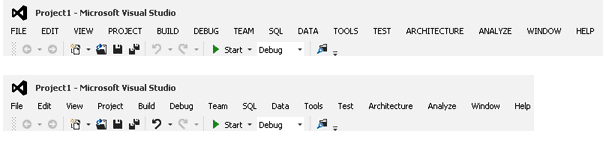 |
Figure 1. The Visual Studio 2012 RC Menus, Before (top) and After. (Click image to view larger version.) |
Even so, it seems a lot of time and effort were spent on things so trivial. Um, how about the way the tools work? How could they be improved? Should we perhaps discuss that?
Nah, I want to get to the bottom of this. I want to hear from real developers how the case of menu items affects the software you make. How will the difference in the images in Fig. 1 change anything you do? (I changed the menu items using a NuGet package. Other workarounds are available on the Web, such as a registry hack technique by Richard Banks.)
Please share your thoughts here or drop me a line.
Posted by David Ramel on 06/29/2012