News
Move Over XAML, Xamarin.Forms Now Does Markup in C#
Although C# markup for Xamarin.Forms has been available since Xamarin.Forms 4.6 (it's now at v4.7) debuted this spring, it was just "introduced" on the Microsoft Developer Blogs site by creator Vincent Hoogendoorn.
Traditionally, Xamarin.Forms markup (used to process, define and present text and UI features) was handled by the declarative language XAML (Extensible Application Markup Language) while logic coding for an app was done in C#. However, Hoogendoorn spearheaded an effort to use declarative style C# instead of XAML for Xamarin.Forms UI, as detailed in his CSharpForMarkup GitHub project. That single-language approach is exhibited in modern UI frameworks like Google's Flutter that uses the Dart programming language and SwiftUI, which uses Swift for iOS apps as a successor to Objective-C.
Hoogendoorn's GitHub site compares three different approaches for marking up an Entry box (more fully detailed here):
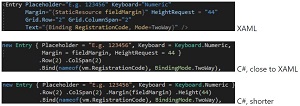 [Click on image for larger view.] Entry Markup Comparison (source: GitHub).
Hoogendoorn's project resulted in C# Markup, which he describes "as a set of fluent helpers and classes that aim to make UI development in C# a joy."
He goes on: "C# Markup helps developers write concise declarative UI markup and cleanly separate it from UI logic, all in C#. Developers get to enjoy C#'s first-class IDE support when writing markup. A single language for markup and logic reduces friction, markup scattering and cognitive load; there is less or no need for language bridging mechanisms like separate converters, styles, resource dictionaries, behaviours, triggers and markup extensions."
C# Markup helpers provide a fluent API with Bind, Effects, Invoke, Assign, Row, Col, FormattedText, Style, Font, inline converters, support for using enums for Grid rows plus columns and more, Hoogendoorn's project says. Examples are shown here:
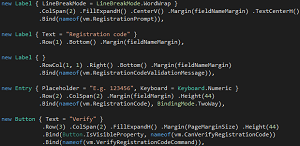 [Click on image for larger view.] Some C# Markup Helper Examples (source: Xamarin.Forms GitHub site).
The July 15 post details a Twitter search app created with the C# Markup approach, for which the source code can be found here.
"C# Markup makes Xamarin.Forms a more attractive alternative for developers who like the single language, declarative approach of modern UI frameworks like Flutter or SwiftUI," Hoogendoorn said in closing. "For new Xamarin.Forms developers without XAML knowledge, C# Markup shortens the learning curve.
"Last but not least, C# Markup does not force you to choose. Apps with a XAML UI can mix-in C# Markup just fine, e.g. to implement parts of the UI that are too complex / dynamic for XAML."
A full review and more guidance can be found in documentation, and feedback can be submitted via the C# Markup Pull Request.
About the Author
David Ramel is an editor and writer at Converge 360.