News
GitHub Desktop 3.0 Enhances Pull Request Integration
Microsoft-owned GitHub announced GitHub Desktop 3.0, noting that it provides better integration for developer pull requests (PRs).
GitHub Desktop, for the unfamiliar, is described as an open source Electron-based GitHub app, written in TypeScript and using React, designed to simplify the sometimes daunting Git DevOps experience of source code management, primarily targeting beginner users and collaborative teams.
"GitHub Desktop 3.0 brings better integration with your GitHub Pull Requests," the company said in an April 26 blog post announcing the update. "You can now receive real time notifications and review the status of your check runs for your pull request."
Checks provide line annotations and detailed messaging to indicate if a developer's commit meets conditions set for a target repository, helping to ensure code is ready for production. GitHub says, "The Check Runs API enables you to build GitHub Apps that run powerful checks against code changes in a repository. You can create apps that perform continuous integration, code linting, or code scanning services and provide detailed feedback on commits."
In the update, users can click on a badge displaying the relevant PR number to see associated checks and rerun failed ones, shown here in an animated GIF:
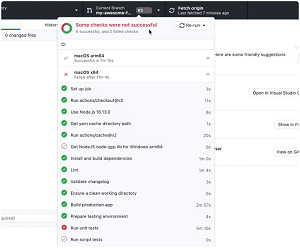 [Click on image for larger, animated GIF view.] GitHub Checks in Animated Action (source: GitHub).
The update also provides high-signal PR notifications designed to cut through the noise that can be generated by notifications of all kinds coming from various apps and sources.
"That's why GitHub Desktop 3.0 does not notify you for every single event in every repository you contribute to," the company said. "Instead, GitHub Desktop 3.0 will only show you notifications when something really important happens in the repository you're working on."
It provided an example scenario in which a developer working on a specific code branch submits a PR and then moves to work in a different branch. GitHub Desktop 3.0 will now generate a system notification for such scenarios, complete with a new dialog that provides details about the problem and making it easy to switch to the problematic branch to either fix thing or re-run those checks, which sometimes results in passed checks.
The update also notifies developers when their PRs are reviewed, letting them know about requested changes, comments or approvals, again providing for an easy switch to the branch in question.
The update's release notes indicate two other items, along with the new notification item:
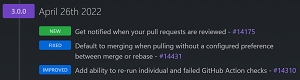 [Click on image for larger view.] GitHub Desktop Release Notes (source: GitHub).
Going forward, the project's roadmap indicates that one area of work will be to provide support for arm64 Windows machines.
About the Author
David Ramel is an editor and writer at Converge 360.