Tips and Tricks
Customize Colors for Code Syntax Highlighting
C#, JavaScript, and ASP.NET MVC coding issues can be made more prominent by customizing code syntax colors.
The most common mistake that C# and JavaScript programmers make is missing braces. Another common mistake that ASP.NET MVC Razor programmers make is to not understand what executes on the server and what executes on the client. Both of these problems can be solved using more obvious code syntax highlighting.
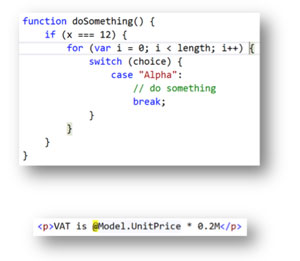
The default color scheme is too subtle which makes it too hard to see matching braces and Razor syntax. Figure 1 shows an example -- why is the unit price of our product not being multiplied by 20 percent?
 [Click on image for larger view.]
Figure 1: Uh-oh... Something Wrong Here
[Click on image for larger view.]
Figure 1: Uh-oh... Something Wrong Here
Improve your coding experience with the following steps:
- On the Tools menu, choose Options.
- In the Environment section, click Fonts and Colors.
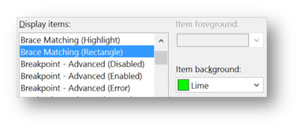
- In the Display items list, choose Brace Matching (Rectangle) and change the Item background to something bold such as Lime. (See Figure 2.)
 [Click on image for larger view.]
Figure 2: Change To Lime
[Click on image for larger view.]
Figure 2: Change To Lime
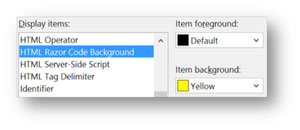
- In the Display items list, choose HTML Razor Code Background and change the Item background to something bold such as Yellow. (See Figure 3.)
 [Click on image for larger view.]
Figure 3: Change To Yellow
[Click on image for larger view.]
Figure 3: Change To Yellow
- Click OK
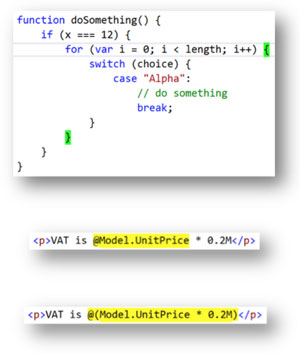
Now it's easy to see matching braces and Razor code, as shown in Figure 4.
 [Click on image for larger view.]
Figure 4: Now, The Problem Is More Apparent
[Click on image for larger view.]
Figure 4: Now, The Problem Is More Apparent
With the customized coloring of the syntactical elements, it's much quicker to spot why the formula isn't working. Now all you have to do is spot it and then fix it.
About the Author
Mark Price, MCT, MCSD, is a full-time trainer for UK-based Firebrand Training. He has more than 20 years of experience working in the IT and developer industry, including a two-year stint working at Microsoft. His expertise covers a number of Microsoft technologies (Azure, ASP.NET Web Forms and MVC, Web API, WCF, jQuery, C#, LINQ, Entity Framework, WPF, and Windows Store apps), HTML5, XAML, and Google developer technologies and the Google App Engine.