News
Workflow Engine 2.0 Improves UI
Version 2.0 of the business process development tool comes in builds for .NET Core and Java, and sports streamlined UI improvements and a number of new methods.
- By Michael Domingo
- 03/10/2017
It's been some time since OptimaJet offered a major update to its business process development tool, WorkflowEngine.NET. Just in time and prior to the launch of Visual Studio 2017 launch earlier this week, the company released and renamed its WorkflowEngine 2.0, which now has support for .NET Core and Java and comes with a myriad number of UI and other improvements.
Workflow engines are software-based applications for managing a project's business processes and logic. Windows Workflow Foundation (WF) is a good example of one that's built into the Microsoft .NET Framework. Workflow Engine aims to become an improved alternative to WF.
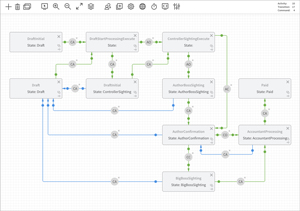
Besides the .NET Core support, there are a number of other improvements, particularly to the Designer user interface, which has been streamlined and easier to understand (see Figure 1).
Related to the Designer is now the capability to print the Designer's viewport to a PDF within a browser sans UI elements, and the Designer can also be made non-editable in case there's a need to distribute it to certain users. Those capabilities come by way of the addition of three new methods: readonlymode(), printablemode(), and editablemode().
Another feature has been added to the Designer, which allows users to be able to use an autocomplete list when working with these fields: Actor.value, the Activity.Implementation.Action parameter, and Transition.Condition.ActionParameter.
There's also a few new methods for modifying the execution time for timers in running processes:
- _runtime.SetTimerValue(processId,timerName,newValue), _runtime.ResetTimerValue(processId, timerName): These two methods now change and reset timer values outside the process.
- _runtime.SetTimerValue(processInstance,timerName,newValue), _runtime.ResetTimerValue(processInstance, timerName): These methods change and reset timer values from within Actions.
 [Click on image for larger view.]
Figure 1: UI Improvements to Designer in WorkflowEngine 2.0
[Click on image for larger view.]
Figure 1: UI Improvements to Designer in WorkflowEngine 2.0
Besides the .NET Core build, version 2.0 also is available in a Java build, according to the company. Get more information from the company Web site.
About the Author
Michael Domingo is a long-time software publishing veteran, having started up and managed several developer publications for the Clipper compiler, Microsoft Access, and Visual Basic. He's also managed IT pubs for 1105 Media, including Microsoft Certified Professional Magazine and Virtualization Review before landing his current gig as Visual Studio Magazine Editor in Chief. Besides his publishing life, he's a professional photographer, whose work can be found by Googling domingophoto.