News
Visual Studio Code 1.16 Eases Code Refactoring, Picking Colors, More
Visual Studio Code's monthly release cadence continues to stream a new supply of goodies in each iteration, with the latest featuring improved code refactoring, color picker, automatic tag closing and much more.
The August 2017 (version 1.16) release features many more enhancements to the cross-platform code editor's workbench, editor, integrated terminal, languages and extension authoring capabilities.
Microsoft's Brian Clark chose to highlight better project management capabilities in a short introductory video published yesterday.
"One of the most sought-after features is being able to manage multiple projects within the same instance of VS Code," Clark said. "The feature is currently only available in the Insiders build, but will soon be available in a stable release."
He proceeded to demonstrate how he could drag a different project from a folder tree into his existing project, upon which he was prompted to create a workspace. After that, he could see both projects at the same time in the same instance of VS Code.
"Wouldn't it be great to avoid writing less HTML?" Clark then asked, demonstrating the tag-closing functionality whereupon typing the closing bracket of a new div tag, for example, automatically inserted the closing div tag.
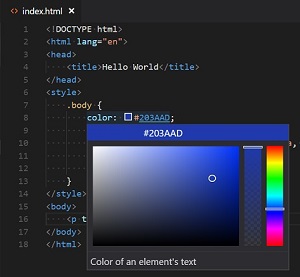 [Click on image for larger view.] Picking a Color from HTML Inline Style (source: Microsoft).
Microsoft thanked company developer Jun Han -- author of the Auto Close Tag in the Visual Studio Marketplace -- for leading the way on that new VS Code feature. "Note that the Auto Close Tag extension has more features, in particular, it can be enabled for languages other than HTML as well," this month's update post said.
In fact, dozens of community and volunteer developers were thanked by name for a number of new features in VS Code.
JavaScript and TypeScript refactoring is also improved, with new "extract method" and "extract function" capabilities that let a developer highlight some repetitive code, for example, upon which a lightbulb symbol appears in the gutter, offering to turn the code into a new method or function.
Upon choosing that option, the selected code is extracted into a new function called newFunction and the project's other code is updated to make use of this new function and also rename it to something more relevant.
That refactoring mechanism -- long available with C# -- was introduced with the new version 2.5 of the open source TypeScript language, just released and expected to be available in the upcoming Visual Studio 2017 version 15.4.
Aslo, VS Code's handy color picker -- previously only available for CSS -- can now be used in HTML inline styles. Upon typing in such a style, a little color icon appears, which can be clicked to bring up the color picker in order to choose the exact desirable shade.
Other highlights of the new release were listed as:
About the Author
David Ramel is an editor and writer at Converge 360.