News
Developers Request, and Get, Database Project for SQL Data Warehouse in Visual Studio
Promising that developers can "save weeks of development effort," Microsoft today answered their request for database project support in Visual Studio to target Azure SQL Data Warehouse projects.
Microsoft announced a preview of such a project that leverages SQL Server Data Tools (SSDT) in Visual Studio for SQL Data Warehouse deployment. The cloud-based enterprise data warehouse is described by the company as a flexible, secure and fully managed analytics platform optimized for running complex queries quickly across petabytes of data.
Doing so, Microsoft said, previously required complicated and time-consuming change management and deployment through the use of SQL and PowerShell scripts, a process it described as "an unmanageable experience" in sprawling modern data warehouse solutions.
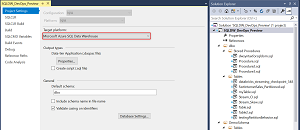 [Click on image for larger view.] New Database Project Support Targeting SQL Data Warehouse (source: Microsoft).
Simplifying that experience through SSDT in Visual Studio was first requested by a developer named Aaron Kim in an April 2016 Azure feedback post that received 752 votes and 73 comments to date:
Database project from Visual Studio to support Azure SQL Data Warehouse
Database project from Visual Studio is useful to manage DDLs, schema compare between the project and database, etc. Please create a project template dedicated for DW or support DW development from Database Project.
Microsoft announced on Oct. 3 that the feature was "started," and today announced a preview.
"With SSDT, database project support enables a first-class enterprise-grade development experience for your modern data warehouse," said Kevin Ngo, program manager, Azure Data.
"You can check data warehouse scripts into source control and leverage Microsoft Azure DevOps within Visual Studio. As your business requirements around data evolve, increase your development velocity with SQL DW by seamlessly applying and deploying changes using features such as schema compare and publish, all within a single tool. You can now save weeks of development efforts with SSDT and begin employing best practices with database DevOps and SQL DW. Gone are the days where you and your team must manually script and manage unstable continuous integration and deployment pipelines with SQL DW."
Citing high demand for the feature, Microsoft said it's managing access to the preview and invited developers to apply for participation via a SQL Data Warehouse Visual Studio SQL Server Data Tools (SSDT) - Preview Enrollment form.
The preview will likely answer developer concerns such as this one that was posted in September by a developer commenting on the original feedback request: "Definitely a huge blocker for customers to think seriously about developing for SQLDW in real life. If not delivered in a timely fashion will leave SQLDW as a permanent 'showcase service' instead of a valuable MPP PaaS solution for the biggest deployments."
About the Author
David Ramel is an editor and writer at Converge 360.