News
Infragistics Updates UI/UX Tooling for Blazor, WinForms, WPF and More
A new update to Infragistics UI/UX tooling enhances many components that target .NET-centric developers, including Blazor, Windows Forms, Windows Presentation Foundation (WPF) and more.
The company is touted by Microsoft as contributing to the UI component system for Blazor -- the popular ASP.NET Core component that allows web development with C# instead of JavaScript -- along with Telerik, DevExpress, Syncfusion, Radzen, GrapeCity, jQWidgets and others.
In a blog post earlier this month, Infragistics detailed what's new for its Ignite UI for Blazor offering, part of the new Infragistics Ultimate 21.1 release. Updated components include the Blazor Grid -- "by far the most popular component" -- and Blazor Date Picker. "In this latest release of Ignite UI for Blazor 21.1, we wanted to make sure we focused on the editing and selection capabilities of the Blazor grid," the company said. "We really wanted to home in the editing and selection experiences so that they feel natural regardless of if you are using a mouse or just the keyboard."
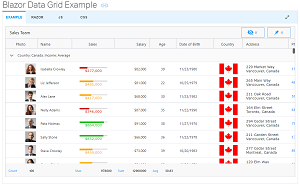 [Click on image for larger view.] Blazor Grid Example (source: Infragistics).
Desktop development components were also updated, with WPF and WinForms of special interest to Visual Studio Magazine readers. "Windows Forms and WPF continue to be the most popular platforms for building apps in the enterprise space," said Infragistics, which announced more than three dozen improvements in charts, geospatial maps, updated designers for .NET Core/.NET 5 design time in Visual Studio, and more. It specifically highlighted:
- New design-time support in Visual Studio 2019 for Windows Forms
- Updates to design-time support in Visual Studio 2019 for WPF
- Chart Updates
- Map Updates
Complete details on what's new in those components can be found in the Windows Forms Release Notes and the WPF Release Notes.
About the Author
David Ramel is an editor and writer at Converge 360.