News
Visual Studio 2022 for Mac Preview Brings Back Xamarin Support
Visual Studio 2022 for Mac keeps trudging along toward general availability several months behind its Windows cousin, with the latest preview introducing new Azure Functions V4 tooling and reintroducing Xamarin mobile tooling.
Those features come in Preview 7 as the dev team switches to a quality cycle after huge efforts to go fully native on the IDE's UI, run natively on M1 (ARM 64) chips, migrate from the Mono runtime to .NET 6 and more.
Last month's Preview 6 completed moving mainline features of the IDE to native macOS UI, and this month's update ported the remaining preference screens: C# Code Formatting; Snippets; Behavior panels for CSS, HTML, and JSON; and External Tools.
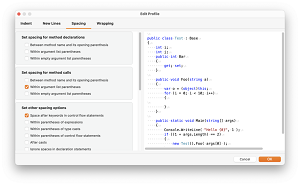 [Click on image for larger view.] The Newly Ported Code Formatting Dialog in Visual Studio for Mac Preferences. (source: Microsoft).
Part of that aforementioned quality focus in this release concerns Xamarin, which in last month's Preview 6 was put on hold. Release notes said: "There are several bugs affecting Xamarin projects in VS for Mac 17.0 Preview 6. Hence, we recommend the use of Visual Studio for Mac 2019 for all mobile projects. We continue to work on improving quality and expect to deliver Xamarin support in VS for Mac 17.0 soon."
"Soon" ended up being the very next preview, with yesterday's announcement post saying: "In this release, we're once again ready to get your feedback on the Xamarin mobile tooling in Visual Studio for Mac. Previously, in the Visual Studio 2022 for Mac Preview 6 release, we made the tough call that Xamarin tooling wasn't ready for feedback while we were addressing known issues."
That meant fixing almost 50 mobile workload bugs, including problems with starting up Android emulators.
Among the new features is support for serverless app development on .NET 6 using Azure Functions V4. .NET 6 support was a highlight of the Azure Functions fall update.
"Adding support for Azure Functions V4 also enables Azure Functions development on M1 (arm64)-based processors, which required the arm64 .NET 6 SDK," yesterday's announcement said. "In this release you can use Azure Functions V4 on Intel or M1-based machines. Azure Functions V2 & V3 projects can be opened and developed on Intel-based processors; support for creating V2 or V3 projects on Intel devices will return in an upcoming preview release."
More details on all of the above and more are presented in the release notes.
About the Author
David Ramel is an editor and writer at Converge 360.