News
Visual Studio Code Tools for Azure Revamped
Microsoft announced a redesign of its Azure extensions for Visual Studio Code.
Those extensions come in the nearly five-year-old Azure Tools pack in the VS Code marketplace, which has been installed more than 500,000 times. It contains various extensions that help cloud application developers work with Azure services for web site hosting, databases, serverless computing, containers, managing virtual machines and much more.
The Azure tooling dev team has been re-architecting the extensions to improve use and navigation and last week announced some redesign updates including:
- Updated Resources view: An explorer update places all extensions into a single, unified view where developers can create and manage their Azure apps. "In addition to the updated view, the grouping of resources is configurable to match your working style," Microsoft said. "The default will group by resource (or service) type to match how the extensions looked before and you can switch to a resource and region view."
- New Workspace view: This displays workspace- and file-specific commands, which can be used to create new Azure Functions projects, deploy a current workspace to Azure and so on. More common commands will be added to the view going forward. Microsoft said: "Once you have the grouping setup the way you like, focus on the parent nodes that are most important to you in your current workspace. This focus will be persisted within the workspace (only on your current machine, not through settings sync) so you can always jump back in where you left off."
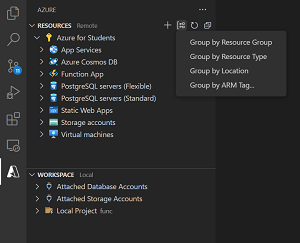 [Click on image for larger view.] New Workspace View (source: Microsoft).
- New Azure Activity Log: This is to address developer feedback about long-running tasks getting lost in notifications. "So we're introducing a new Azure Activity Log in the panel where you can track your activities within the extensions and quickly access common commands on any resources you create," Microsoft said.
Going forward, the dev team will work to improve functionality such as creating and connecting Azure resources to compose applications. "Our goal is to make the resources you need available in the way you need them while you work on your apps," Microsoft said. "Keep an eye out and let us know if you have any feedback or just want to talk about Azure in VS Code."
About the Author
David Ramel is an editor and writer at Converge 360.