News
Custom Blazor Elements No Longer Experimental in .NET 7 Preview 6
Custom Blazor elements graduated from the experimental stage to become part of .NET 7 in the just-released sixth preview of the framework, due to debut in November.
Blazor, part of the ASP.NET Core web-dev framework that's in turn part of the umbrella .NET 7 framework, comes in client-side and server-side components that allow for browser-based apps primarily written in C# instead of JavaScript.
Blazor custom elements, meanwhile, are built with a NuGet package (Microsoft.AspNetCore.Components.CustomElements) that lets developers use standard HTML interfaces to implement custom HTML elements.
The ability to create custom Blazor elements was introduced in September of last year in the .NET 6 Release Candidate 1.
Once created, these custom elements -- a custom counter, for example -- can also be used in other single-page application (SPA) web frameworks such as React and Angular. A sample project, aptly titled Blazor Custom Elements, shows how to do just that, providing examples about how to work with those frameworks and the client-side Blazor WebAssembly component as well as Blazor Server.
To create a custom element using Blazor, developers must first register a Blazor root component as a custom element:
options.RootComponents.RegisterCustomElement<Counter>("my-counter");
After which the custom element can be used with Blazor or any other web framework:
<my-counter increment-amount="10"></my-counter>
Other Blazor-related features in .NET 7 Preview 6 include empty Blazor project templates, according to a July 12 blog post authored by Daniel Roth, principal program manager for ASP.NET.
"Blazor has two new project templates for starting from a blank slate," Roth said. "The new 'Blazor Server App Empty' and 'Blazor WebAssembly App Empty' project templates are just like their non-empty counterparts but without any extra demo code. These empty templates have only a very basic home page, and we've also Bootstrap so you can start with whatever CSS framework you prefer."
The new templates are available from within Visual Studio after the .NET 7 SDK has been installed. As shown in the graphic below, the descriptions for them read:
- Blazor Server App Empty: An empty project template for creating a Blazor server app that runs server-side inside an ASP.NET Core app and handles user interactions over a SignalR connection. This template does not have any content in it.
- Blazor WebAssembly App Empty: An empty project template for creating a Blazor app that runs on WebAssembly and is optionally hosted by an ASP.NET Core app. This template does not have any content in it.
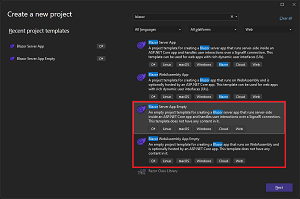 [Click on image for larger view.] Empty Blazor Project Templates (source: Microsoft).
And finally, there's yet another Blazor highlight in Roth's ASP.NET-centric post, an experimental QuickGrid component. It's designed to quickly and efficiently display data in tabular form. "QuickGrid provides a simple and convenient data grid component for the most common needs as well as a reference architecture and performance baseline for anyone building Blazor data grid components," Roth said.
Although still experimental and not committed to be a part of .NET 7, the open source component is available for use, about which Microsoft is soliciting feedback.
"QuickGrid is highly optimized and uses advanced techniques to achieve optimal rendering performance," Roth said. "The QuickGrid demo site is built using Blazor WebAssembly and is hosted on GitHub Pages. The site loads fast thanks to static prerendering using jsakamoto's BlazorWasmPrerendering.Build project.
"It's not a goal to add all the features to QuickGrid that full-blown commercial grids tend to have, for example hierarchical rows, drag-to-reorder columns, or Excel-like range selections. If you need those, continue using commercial grids or other open-source options."
Other highlights of the ASP.NET Preview 6 update include:
Roth invited developers to provide feedback on the above on GitHub.
About the Author
David Ramel is an editor and writer at Converge 360.