News
Containerized Blazor: Microsoft Ponders New Client-Side Hosting
Microsoft is exploring built-in container support for client-side Blazor WebAssembly apps.
The initial stages of that investigation include a Twitter question associated with a feature request on the company's Developer Community feedback site.
That question reads: "If you are doing #Blazor Wasm projects that are NOT aspnet-hosted, how are you hosting them? Would this be useful for you -- comment on the issue and what you might expect in the containerization of a Blazor Wasm project?
The tweet points to the "Docker support for Blazor WASM Projects" feature request on the feedback site, posted Oct. 27 by Microsoft's Brady Gaster. It reads:
With most Web projects, one can right-click the project and elect to add Docker support. With Blazor WASM standalone projects, the Add Docker support flyout is missing. It would be great if we could either:
- Add Docker support to for Blazor WASM projects, and drop in a base package that can serve the WASM app. We could use a simple nginx container or a pre-bult Kestrel image.
- Add a flyout menu for Blazor WASM projects one can click that would drop in a 'host project' so folks who start with the WASM project can add a host after-the-fact, and it'd be pre-wired to serve the WASM app.
Heuer's same-day tweet, posted to solicit more feedback, has received responses from just a couple developers, one noting that such apps can be hosted as a static web page. Heuer responded: "Yep (note: I work on this team and help deliver the tools 🙂). But if someone wanted to do this (because of their reasons) I'm solicitations [sic] what they'd expect."
Indeed, it was Heuer himself who authored the 2020 article, "Hosting Blazor WebAssembly in Azure Static Web Apps (Preview)."
That static-site functionality was actually proposed on the Developer Community site last year with a post titled "Visual Studio supports creating, debugging and deploying apps to Azure Static Web Apps" and has been placed on the Visual Studio roadmap.
Otherwise, there was no valid feedback to Heuer's post or the Oct. 27 Developer Community post.
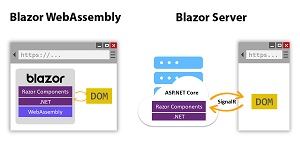 [Click on image for larger view.] Blazor (source: Microsoft).
As far as ASP.NET Core Blazor hosting models, prior to ASP.NET Core 6.0 they included Blazor Server and Blazor WebAssembly, the latter for browser-based client-side apps. With ASP.NET Core 6, Blazor Hybrid was added, wherein Razor components run directly in the native app (not on WebAssembly) along with any other .NET code and render web UI based on HTML and CSS to an embedded WebView control through a local interop channel, Microsoft says.
Outside of ASP.NET Core, other hosting models are scarce and unofficial.
However, among numerous individual projects attempting to containerize Blazor apps is one effort from Blazor expert Chris Sainty: "Containerizing a Blazor WebAssembly App." It followed a project in which he containerized a Blazor Server app. He said that while creating a dockerfile for a Blazor Server app was pretty trivial, that's not the case on the client side of things.
"Blazor WebAssembly projects present us with a different challenge, when published they produce static files," he said. "Unlike Blazor Server apps, we don't need the ASP.NET Core runtime to serve them. This means we can drop the ASP.NET Core runtime Docker image we used in part 1 as the base for our final image. So how are we going to serve our files? The answer is NGINX."
He explained that the free and open source nginx web server can also be used as a reverse proxy, load balancer and HTTP cache, being able to serve static content fast while using significantly less memory when compared to Apache and able to handle up to four times the number of requests per second.
Also, nginx was proposed as the answer to a problem faced by a developer who couldn't get "Blazor client in Docker container" to work and sought help on the Microsoft Learn site. The accepted answer to the problem included this (no editing): "a blazer web assembly app is a static website. it requires a Web server to host it. so to deploy to docker container, you need to pick a container with web server support (typically ngnix), and copy the wwwroot folder to a location folder defined in the webserver."
As noted above, nginx was proposed as part of a potential Microsoft-backed solution, along with Kestrel and other options.
Based on the tepid feedback received on Heuer's tweet (two developers, one off-topic) and the Developer Community post (zero developers), it doesn't appear adding right-click Docker support for Blazor WebAssembly apps in Visual Studio is a big issue among the ranks, so Microsoft might not do anything at all. Stay tuned to find out.
About the Author
David Ramel is an editor and writer at Converge 360.