News
Microsoft Previews .NET MAUI Extension for VS Code
Brand new in the Visual Studio Code Marketplace is a .NET MAUI tool that provides cross-platform developers with easy access to the evolution of Xamarin.Forms that adds the ability to create desktop apps.
.NET MAUI (Preview) has been installed 31 times as of this writing. However, it's not a standalone offering, designed to be used in conjunction with the C# Dev Kit, which debuted last month and is designed to improve the C# development experience on Linux, macOS, Windows and more (see "What's in Microsoft's New C# Dev Kit for Visual Studio Code").
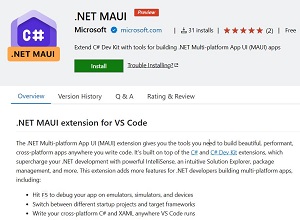 [Click on image for larger view.] .NET MAUI (Preview) (source: Microsoft).
The tool's description indicates it's actually built on top of that C# Dev Kit, along with Microsoft's main C# extension (22 million installs), which helps provide IntelliSense code completion along with an intuitive Solution Explorer, package management and so on. Installing the new .NET MAUI extension will automatically installs the C# extensions also.
The new tool adds more features for .NET developers building multi-platform apps, including:
- Hit F5 to debug your app on emulators, simulators and devices
- Switch between different startup projects and target frameworks
- Write your cross-platform C# and XAML anywhere VS Code runs
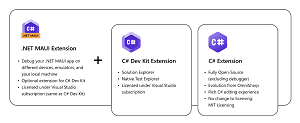 [Click on image for larger view.] All the Tooling (source: Microsoft).
"The .NET MAUI extension lets you develop and debug your app on devices, emulators, and simulators from VS Code," Microsoft said in an announcement today (July 11). ".NET MAUI and C# Dev Kit borrow some familiar features from Visual Studio to enhance your productivity, making your mobile and desktop development delightful with C# in VS Code."
However, the new tool also borrows something else from the C# Dev Kit: pricing (as opposed to "free").
"Given C# Dev Kit and the .NET MAUI extensions build on the same foundations as Visual Studio for some of its functionality, it uses the same license model as Visual Studio," Microsoft said. "This means it's free for individuals, as well as academia and open-source development, the same terms that apply to Visual Studio Community. For organizations, the C# Dev Kit and its family of extensions are included with Visual Studio Professional and Enterprise subscriptions, as well as GitHub Codespaces. For additional details see the license terms."
Those license terms came under fire from some developers, including former Microsoft employee and Xamarin co-creator Miguel de Icaza.
Microsoft is soliciting feedback on this Preview 1, which can be provided from within VS Code or via the project's GitHub repo.
About the Author
David Ramel is an editor and writer at Converge 360.