News
Use Azure Quantum 'Playground' to Explore New v1.0 Dev Kit
Microsoft finally shipped v1.0 of its Azure Quantum Development Kit (QDK) after last year changing directions and using the Rust programming language for a re-write.
It's been a long road, as the kit debuted in 2017, being described as "a set of open-source tools designed to help developers write quantum programs at scale" for quantum computing, a potential revolutionary game changer that might or might not ever materialize into practical applications, having been stuck in the experimental stage for years.
Microsoft last September announced the Rust-driven re-write that made the QDK much smaller and faster and able to run on the web thanks to the use of WebAssembly.
Earlier this month, it shipped v1.0, though the company described it as "an early preview" with much work to be done to reach the "stable" stage. The previous kit ("Classic QDK") is still functional, and in developer guidance the company refers to the new offering as the "Modern QDK"
"As outlined in an earlier blog post, this is a significant re-write over the prior QDK with an emphasis on speed, simplicity, and a delightful experience," Microsoft said in its announcement earlier this month.
Some highlights include:
- A full-featured browser experience
- Vastly simplified installation across platforms
- Up to 100x performance improvement
- Comprehensive code editing productivity features
- A debugger to gain new insights as you develop and fix your quantum programs
- Powerful resource estimation capabilities directly in the editor
- Integration with the Azure Quantum service
The QDK comes in a Visual Studio Code extension, which has reached more than 2,100 installs since its September 2023 debut.
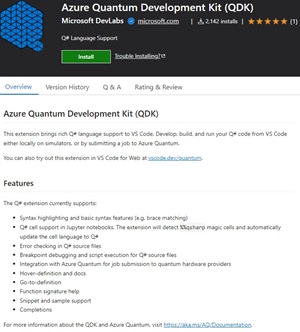 [Click on image for larger view.] Azure Quantum Development Kit (QDK) (source: Microsoft).
The Azure Quantum Playground
This playground, using VS Code for the Web (https://vscode.dev/quantum/playground/) is the fastest way to get started using the new QDK, Microsoft said.
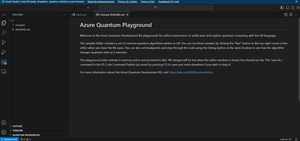 [Click on image for larger view.] Azure Quantum Playground (source: Microsoft).
"This URL loads an instance of VS Code in the browser with the QDK extension preinstalled, along with a virtual file system pre-loaded with some common quantum algorithms," Microsoft said. "You can experiment here, then simply close the browser tab when done, without installing anything or accessing any files on your local machine." Devs can also use regular VS Code locally or VS Code for the Web directly.
Microsoft described the v1.0 release as "the beginning of a journey" with much more work to be done, including:
- Improvements to the Q# language
- More powerful resource estimation capabilities
- Package management for code sharing
- Advanced compiler capabilities (such as better hardware targeting)
- Richer visualizations
- Better documentation and samples
The company is soliciting feedback -- including bug reports -- in a GitHub issue tracker.
About the Author
David Ramel is an editor and writer at Converge 360.