News
Workarounds Listed for Upcoming Visual Studio App Center Retirement
Microsoft's last vestiges of HockeyApp are not long for this world.
The company will retire Visual Studio App Center in a year, listing several workarounds to replace the package of integrated developer services for building, testing, releasing and monitoring mobile/desktop apps that itself replaced a tool called HockeyApp in 2019.
The mobile-centric offering actually debuted way back in 2017, when it was described as "a mission control" service primarily for Android/iOS apps that provided end-to-end integration and management of the application lifecycle. It provided automated builds, testing on real devices in the cloud, distribution to beta testers and app stores, and monitoring of real-world usage through crash and analytics data.
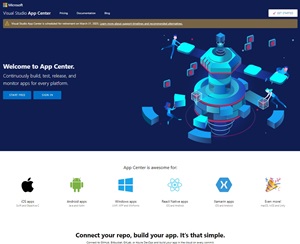 [Click on image for larger view.] Visual Studio App Center (source: Microsoft).
Last week, Microsoft announced the upcoming retirement of the service, which will be shut down on March 31, 2025, after which it will not be possible to sign in with a user account or make API calls. It will continue to be supported until retirement with critical bug fixes and technical support.
With no ready-made replacement in the wings, Microsoft offered a bevy of separate workarounds to duplicate Visual Studio App Center functionality using a variety of tools and approaches that leverage products from Apple, Google and others. They were presented in a table:
| App Center capability |
Recommended alternative solution |
| Build |
We recommend migrating your builds from App Center to Azure Pipelines, leveraging the Export App Center Build feature. |
| Test |
For app device testing, we recommend BrowserStack App Automate. BrowserStack provides access to 20,000+ real iOS and Android devices. BrowserStack has developed the Device Testing CLI to support migrating from Microsoft App Center to BrowserStack App Automate.
You can find the full guidance for migration to BrowserStack here. |
| Distribution |
We recommend Apple's AppStore for iOS app production releases and Apple's TestFlight for iOS app test releases. For Android applications we recommend Google Play for production releases and Google Play Console for test releases.
Azure Pipelines tasks can be used for distributing to AppStore/TestFlight and Google Play.
For Microsoft Store applications, we recommend using Package Flights feature available in Partner Center. |
| Code Push |
We have prepared a special version of CodePush to integrate into your app and run independently from App Center. If you'd like to get access to the codebase of this CodePush standalone version, please reach out to our support team at [email protected] for more information. |
| Analytics & diagnostics |
We recommend one of the Azure Native ISV services which provide rich capabilities for mobile analytics and diagnostics. By leveraging these Azure Native ISV services, you will be able to monitor your complete stack from device to your backend infrastructure on Azure.
Click on each link below to see the documentation for Azure Native ISV service of your choice.
Azure Native ISV Services:
Microsoft Store app developers can access analytics & diagnostics data through Partner Center Dashboard. Additionally, UWP applications published in Microsoft Store can log custom events through the Microsoft Store Services SDK. |
On the day before that announcement was made, Microsoft updated its "App Center SDK" and other related documentation, noting the upcoming retirement.
The retirement announcement comes some four years after Microsoft said goodbye to HockeyApp and hello to Visual Studio App Center. HockeyApp was a popular service for distributing beta versions of mobile apps and collecting crash reports, among other things.
Last week's announcement prompted some angry comments on Reddit threads here and here.
"This really sucks, actually," said one comment. "I distribute a .net desktop app and it gives a great platform for having beta testers and analytics. Been using it since it was hockeyapp. Gotta pour one out and find an alternative that works for desktop apps."
About the Author
David Ramel is an editor and writer at Converge 360.