News
Visual Studio 2022 v17.11 Preview 1 Targets 'Quality-of-Life' Features
Who doesn't want a better quality of life? Visual Studio 2022 v17.11 Preview 1 is here to help, at least for developers using Microsoft's flagship IDE.
The first preview of v17.11 introduces various quality-of-life improvements for developers across all workloads, providing updates in code search, pull request comments, debugging, profiling and several other enhancements, various bug fixes and community-driven improvements.
"When you use Visual Studio, you want to feel empowered and productive," said Microsoft's Mads Kristensen in announcing Preview 1 yesterday (May 21). "That's why quality-of-life features are so important: they make coding a smooth and enjoyable experience, free of unnecessary hassles and headaches."
The principal product manager for Visual Studio pointed to the release notes for more information, where developers can find details on the following:
Productivity
- Enhanced code search scoping: Narrow down code search to the current document, project or entire solution.
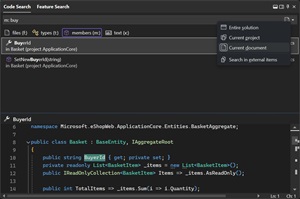 [Click on image for larger view.] Code Search (source: Microsoft).
- Improved pull request comments integration: View and interact with GitHub and Azure DevOps PR comments directly in the editor.
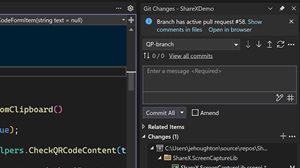 [Click on image for larger view.] Pull Request Comments (source: Microsoft).
- Draft PRs and templates: Create pull request drafts and use GitHub templates for descriptions.
- Updated keyboard shortcuts for better familiarity: More familiar shortcuts, such as
Ctrl+/ for toggling line comments and Ctrl+Shift+P for opening the command palette.
Debugging
- Easier handling of async exceptions: Automatically breaks on async method exceptions in ASP.NET applications.
- Consistent profiling with persisted target selection: Instrumentation tool remembers target selections between runs.
- External code profiling: Auto-decompilation for .NET libraries when source code is unavailable.
IDE
- Component detection: Improved detection and notification of missing components and extensions using *.vsconfig files.
- User authentication: Default authentication mechanism now uses Web Account Manager (WAM) for better security and user experience.
Development Workloads
- Prioritized WinUI templates: Easier access to WinUI templates in new project dialogs.
- NPM packages in Solution Explorer for JavaScript/TypeScript projects: NPM packages now listed under the Dependencies node for JavaScript and TypeScript projects.
- New Unreal Engine class templates and toolbar: Add common Unreal Engine class templates to projects easily; dedicated toolbar for quick access to Unreal Engine actions.
- Command line arguments toolbar for C++ projects: Set and change command line arguments directly from a toolbar.
- CMake debugging for Linux projects: Debug CMake scripts for Linux projects using WSL or SSH.
Bug Fixes
- Rich copy/paste issues: Fixes for C# source code copy/paste issues in Office.
- Pointer errors: Correction of errors related to in-class pointers to member variables.
- Type optimization fixes: Fix for type switches from signed to unsigned during optimization.
- Branch switching issues: Resolution of index out-of-bounds errors when switching branches.
- Code analysis warnings: Addressing false positives for Warning C26434.
- Debugger visualizations: Improvement in partial visualizations of std::variant in the debugger.
About the Author
David Ramel is an editor and writer at Converge 360.