News
VS Code Team Solicits Improvements: 'Done!'
Based on years of observance, it's clear that Microsoft's dev teams are great about soliciting feedback from the community and responding to it. Yes, it might literally take years to fulfill a big request, but the teams do a remarkable job of addressing user concerns. The Visual Studio Code team is no exception, and they recently asked for feedback on the product's features and functionality.
Devs weren't shy about responding to a recent social media post from the VS Code Team's Burke Holland, who asked for feedback on the editor, including GitHub Copilot.
Here are some examples of user requests for improvements and Holland's replies:
-
Developer Request: "I would like you to make it possible to display the terminal in a separate window. I believe there is a tricky way to display the terminal in a separate window in VS Code, but I would like you to enable displaying the terminal in a separate window easily using a standard method."
Holland: There is now a "Open Chat in New Window" that you can get to from the chat ellipsis menu, or from the Command Palette. Chat windows have the option for a "compact" mode which removes top and bottom ui to keep you focused.You can also pin the window so it's always on top.
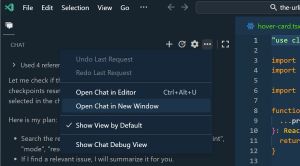 [Click on image for larger view.] Terminal Window (source: Microsoft).
-
Developer Request: "clicking confirm for every command agent runs is annoying. (maybe do allow/block list)"
Holland: We have "Allow" and "Deny" list for terminal today. These are experimental - check it out and let us know!
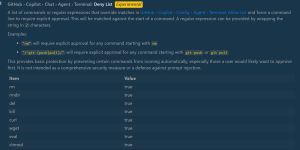 [Click on image for larger view.] Allow/Deny (source: Microsoft).
-
Developer Request: "If there could be a way to natively save all the chats I have with Co-Pilot even when I upload my repo and work on a different workspace it would be nice to have the old chats as an .md file or in Co-Pilot via a menu. Having to ask Co-Pilot every time I save a file is tedious"
Holland: Chat history is saved today and can be accessed from the top of the chat sidebar. Opened an issue for persisting history here
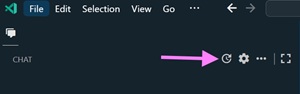 [Click on image for larger view.] Chat History (source: Microsoft).
-
Developer Request: "I would like to see active type hinting (completion) in the terminal. Not AI, just system type hinting My emulator has it and I miss it in VSCode"
Holland: Done! As of today you can try terminal completion in preview. Go to settings and look for "terminal integrated suggest".
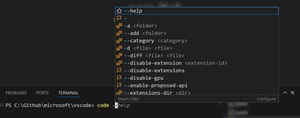 [Click on image for larger view.] Type Hinting (source: Microsoft).
-
Developer Request: "...Tasks/Todo List"
Holland: We're looking at it! What do you think? [see post at link below to view video]
-
Developer Request: "you should how tokens are used..."
Holland: We're looking at that too! What if you could see the token usage just right there in the chat? Would you prefer to see the number of tokens or the % context window remaining?
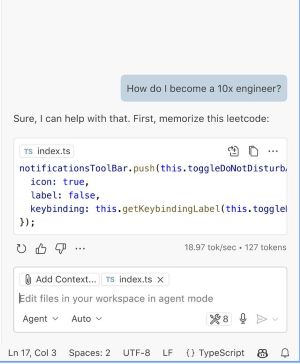 [Click on image for larger view.] Token Usage (source: Microsoft).
-
Developer Request: "Have an auto mode that selects the best model automatically"
Holland: See the screenshot in the previous tweet. Actively being worked on as I type this.
-
Developer Request: "What happened to the undo/rollback feature. I can no longer go back to previous state anymore?? ... Maybe because you guys cannot fix such bugs and removed it?"
Holland: Nope - still there. It's now called "Checkpoint". Roll back to any previous point in the chat history and adjust your prompt.
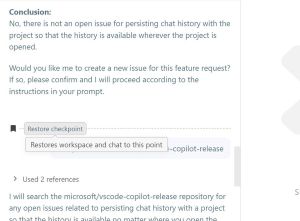 [Click on image for larger view.] Undo Feature (source: Microsoft).
There's a bunch more on the thread, with feature requests coming in as of yesterday. You can check it out here.
About the Author
David Ramel is an editor and writer at Converge 360.