The Data Science Lab
Tsetlin Machine Binary Classification Using C#
The goal of a machine learning binary classification problem is to predict a variable that has exactly two possible values. For example, you might want to predict the sex of a company employee (male = 0, female = 1) based on salary, height, years of education, and so on.
There are approximately a dozen common binary classification techniques. Examples include logistic regression, k-nearest neighbors, decision tree (several types such as random forest and adaptive boosting), naive Bayes, and neural network binary classification. Each technique has pros and cons. A relatively new technique is called Tsetlin Machine binary classification. The technique is named after a Soviet mathematician who studied some of the underlying ideas in the 1950s.
This article presents a demo of Tsetlin Machine binary classification, implemented from scratch, using the C# language. In addition to binary classification, Tsetlin Machine systems can also be used for multi-class classification and for regression problems. But this article addresses only binary classification.
A good way to see where this article is headed is to take a look at the screenshot in Figure 1. The demo program begins by loading a two-class subset of the well-known Iris Dataset into memory. The goal is to predict the species of an Iris flower based on four features: sepal length, sepal width, petal length, petal width. The data looks like:
0, 0, 1, 1, 0, 0, 1, 0, 0, 0, 0, 0, 0, 0, 0, 0,  0
0, 0, 1, 1, 0, 0, 0, 1, 0, 0, 0, 0, 0, 0, 0, 0,  0
. . .
0, 1, 0, 0, 0, 0, 0, 1, 0, 0, 1, 0, 0, 0, 0, 0,  1
0, 0, 1, 1, 0, 0, 0, 1, 0, 0, 1, 0, 0, 0, 0, 0,  1
There are 17 values on each line. The first 16 are predictor values that have been binary encoded. The last value is the target species to predict, setosa = 0, versicolor = 1. There are 80 training items and 20 test items. A simultaneous strength and weakness of Tsetlin Machine systems is that predictor values must be binary encoded.
 [Click on image for larger view.] Figure 1: Tsetlin Machine Binary Classification in Action
The demo creates and trains a Tsetlin Machine model, evaluates the model accuracy on the training and test data, and then uses the model to predict the target y value for the first training item.
The first part of the demo output shows how a Tsetlin Machine model is created:
Setting nClauses = 20
Setting nFeatures = 16
Setting nStates = 50
Setting s (random update inverse frequency) = 3.0
Setting threshold (voting max/min clip) = 10
Creating Tsetlin Machine binary classifier
Done
A Tsetlin Machine model has five architecture parameters: number of clauses, number of features/predictors, number of possible automata states, random update frequency, and a voting threshold/clip value. These architecture parameters must be determined by trial and error.
The next part of the output shows the training process:
Setting training maxEpochs = 100
Starting training
Epoch    0 |  Accuracy = 0.5000
Epoch   20 |  Accuracy = 0.8375
Epoch   40 |  Accuracy = 0.8750
Epoch   60 |  Accuracy = 0.9125
Epoch   80 |  Accuracy = 0.9125
Done
Training a Testling Machine is an iterative process and requires a maximum number of epochs, where an epoch is one complete pass through the training data items. Tsetlin Machine training is computationally expensive, so the demo displays progress every 20 epochs to verify that training has not stalled for some reason.
The demo concludes by evaluating the trained model and making a prediction:
Accuracy (train) = 0.9125
Accuracy (test) = 0.9500
Predicting class for trainX[0]
Predicted y = 0
The model accuracy on the training data (91.25% = 73 out of 80 correct) and on the test data (95.00% = 38 out of 40 correct) are reasonable, but the Iris Dataset is easy to predict. The predicted species of the first training item is y = 0 = setosa, which is correct.
This article assumes you have intermediate or better programming skill but doesn't assume you know anything about Tsetlin Machine binary classification. The demo is implemented using C#, but you should be able to refactor the demo code to another C-family language if you wish. All normal error checking has been removed to keep the main ideas as clear as possible.
The source code for the demo program is too long to be presented in its entirety in this article. The complete code and data are available in the accompanying file download, and they're also available online.
The Demo Data
The raw Iris Dataset is available online. The data looks like:
5.1, 3.5, 1.4, 0.2, Iris-setosa
4.9, 3.0, 1.4, 0.2, Iris-setosa
. . .
7.0, 3.2, 4.7, 1.4, Iris-versicolor
6.4, 3.2, 4.5, 1.5, Iris-versicolor
. . .
6.2, 3.4, 5.4, 2.3, Iris-virginica
5.9, 3.0, 5.1, 1.8, Iris-virginica
There are 150 items: 50 setosa, 50 versicolor, 50 virginica. For binary classification, the demo uses only the setosa and versicolor items. The first 40 setosa and first 40 versicolor items are used for training, and the remaining 20 setosa and versicolor items are used for testing.
The four predictor variables are sepal length (a sepal is a green leaf-like structure), sepal width, petal length, and petal width. Tsetlin Machine classification requires predictor values to be binary encoded. I used the encoding scheme from an example on the primary implementation reference. The mapping is:
[0.0, 1.5] = 0000
[1.6, 3.1] = 0001
[3.2, 4.7] = 0010
[4.8, 6.3] = 0011
[6.4, 7.9] = 0100
Because there are four predictor values, and each value is mapped to four binary digits, each encoded data item has 16 predictors. Notice that the first binary mapping value is always 0, so it could have been omitted and then each encoded data item would have 12 predictors.
The particular binary encoding scheme used by a Tsetlin Machine classifier is a meta-parameter. For example, an alternative, more granular, one-hot based encoding for the Iris Dataset is:
[0.0, 0.9] = 10000000
[1.0, 1.9] = 01000000
[2.0, 2.9] = 00100000
[3.0, 3.9] = 00010000
[4.0, 4.9] = 00001000
[5.0, 5.0] = 00000100
[6.0, 6.9] = 00000010
[7.0, 7.9] = 00000001
The flexibility of the predictor encoding is a simultaneous strength and weakness of Tsetlin Machine systems. Binary encoding can encode any kind of predictor variable, but binary encoding typically requires a lot of processing, which impacts performance. Binary encoding is flexible, but different data scientists may use different encoding schemes, which can make comparing models difficult.
Understanding Tsetlin Machine Models
Tsetlin Machine binary classification systems are significantly more complex than other binary classification techniques, and Tsetlin Machine systems use a fundamentally different paradigm than other classification systems. They have characteristics of propositional logic, finite state machine automata, and rule-based aggregation.
The diagram in Figure 2 is a high-level illustration of some of the key ideas used by Tsetlin Machine systems. The diagram shows half of a Tsetlin Machine classifier with four clauses (nClauses in the demo). Each of the four clauses has five finite state automata (in general, one per predictor, nFeatures in the demo) that have integer values that are either less than nStates (set to 20 in the demo) or greater than nStates.
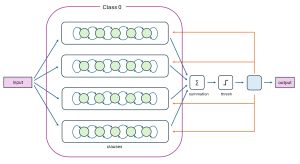 [Click on image for larger view.] Figure 2: The First Half of a Tsetlin Binary Classification System
Each clause votes for the output to be 0 or 1. Voting sums are clipped between -10 and +10 (the threshold value in the demo). The sum of the clipped clause votes is computed and if the sum is positive, the predicted class is 1, and if the sum is negative, the predicted class is 0.
The diagram in Figure 2 shows the first half of a binary classifier, for class 0. There is a second set, not shown, of clauses and automata for class 1. To summarize, a Tsetlin Machine binary classifier that has nFeatures = 5, nClauses = 4, and nStates = 100 will have 5 * 4 * 2 = 40 finite state automata, where each automata has a value centered about 100 (some less, some greater).
The demo program stores the finite state automata in a 3D matrix (sometimes called a cuboid) named taState. It is instantiated with the statement this.taState = MatUtils.MakeCuboid(nClauses, nFeatures, 2) where the 2 is the number of classes. After training, the values in taState are:
clause[0]:        clause[1]:      . . .  clause[19]

[ 0]     9  93    [ 0]     6  94         [ 0]     3  82
[ 1]     8  51    [ 1]     4  90         [ 1]     2  86
[ 2]    59   8    [ 2]    89   6         [ 2]    85   1
. . .             . . .                  . . .
[15]     8  64    [15]     1  88         [15]    14  84
class:  (0) (1)           (0) (1)                (0) (1)
So, for example, taState[19][2][0] = 85. In addition, there is a constant clauseSign vector that has nClauses values: [1, -1, 1, -1, 1, -1, 1, -1, 1, -1, 1, -1, 1, -1, 1, -1, 1, -1, 1, -1]. The values at even numbered indices are +1 and values at the odd numbered indices are -1. The clauseSign values modify the output sum of the clauses to account for class 0 vs. class 1. Compared to programmatically checking clause modality, this storage design is a bit strange, but it is one used by the de facto authoritative implementation.
Training a Tsetlin Machine binary classifier is the process of iteratively modifying the values in the taState cuboid so that predicted y values get closer to the known correct target y values in the training data. On each training input, each state automata value is either incremented by 1, decremented by 1, or left alone. This is computationally expensive in terms of number of operations, but computationally efficient in terms of each operation. The training algorithm is complex, and it is best understood by examining the implementation.
The Demo Program
I used Visual Studio 2022 (Community Free Edition) for the demo program. I created a new C# console application and checked the "Place solution and project in the same directory" option. I specified .NET version 8.0. I named the project TsetlinMachineBinary. I checked the "Do not use top-level statements" option to avoid the strange program entry point shortcut syntax.
The demo has no significant .NET dependencies and any relatively recent version of Visual Studio with .NET (Core) or the older .NET Framework will work fine. You can also use the Visual Studio Code program if you like.
After the template code loaded into the editor, I right-clicked on file Program.cs in the Solution Explorer window and renamed the file to the more descriptive TsetlinMachineBinaryProgram.cs. I allowed Visual Studio to automatically rename class Program.
The demo code is based on the more-or-less de facto Tsetlin Machine binary classifier implementation on GitHub here. That implementation is written using the Pyrex language, which is a hybrid of C and Python. I tried to use the same variable and method names as much as possible so that you can use the GitHub implementation as a reference resource.
The overall program structure is presented in Listing 1. All the control logic is in the Main() method in the Program class. All of the Tsetlin Machine binary classification functionality is in a TsetlinMachine class. The TsetlinMachine class exposes a constructor and three methods: Train(), Predict(), and Accuracy().
The private methods CalculateClauseOutput(), SumClauseVotes(), Update(), and Shuffle() are used by the Train() and Predict() methods. In particular, Train() calls Update() which does most of the work. The MatUtils class has static methods to load data into a matrix in memory, initialize a cuboid, and display matrices and vectors.
Listing 1: Overall Program Structure
using System;
using System.IO;
using System.Collections.Generic;

// adapted from TsetlinMachine.pyx (Pyrex)
// at github.com/cair/TsetlinMachine/tree/master

namespace TsetlinMachineBinary
{
  internal class TsetlinMachineBinaryProgram
  {
    static void Main(string[] args)
    {
      Console.WriteLine("Begin Tsetlin Machine binary" +
        " classification demo ");

      // 1. Load data
      // 2. create model
      // 3. train model
      // 4. evaluate model
      // 5. use model

      Console.WriteLine("End Tsetlin demo ");
      Console.ReadLine();
    }
  }

  // ========================================================

  public class TsetlinMachine
  {
    public int nClauses;
    public int nFeatures;
    public int nStates;
    public double s;
    public int threshold;
    private Random rnd;

    public int[][][] taState;
    public int[] clauseSign;
    public int[] clauseOutput;
    public int[] feedbackToClauses;

    public TsetlinMachine(int nClauses, int nFeatures,
      int nStates, double s, int threshold, int seed) { . . }

    public int Predict(int[] x) { . . }
    public void Train(int[][] X, int[] y, int maxEpochs) { . . }
    public double Accuracy(int[][] X, int[] y) { . . }

    private void CalculateClauseOutput(int[] x) { . . }
    private int SumClauseVotes() { . . }
    private void Update(int[] x, int y) { . . }
    private void Shuffle(int[] sequence) { . . }

  }

  // ========================================================

  public class MatUtils
  {
    public static int[][] MatLoad(string fn,
      int[] usecols, char sep, string comment) { . . }

    public static int[] MatToVec(int[][] A) { . . }
    public static void VecShow(int[] vec, int wid) { . . }
    public static int[][][] MakeCuboid(int n1, int n2, int n3) { . . }
    public static void ShowCuboid(int[][][] cuboid, int wid) { . . }

  }

  // ========================================================

} // ns
The TestlinMachine class declares its ten fields with public scope so that they can be accessed directly. The seed value is used to initialize an internal Random object, which is used to initialize the finite state automata values, insert randomness in training in the Update() method, and scramble the order in which training items are processed via the Shuffle() method.
Loading the Data into Memory
The demo program starts by loading the 80-item training data into memory:
string trainFile =
  "..\\..\\..\\Data\\iris_two_classes_train_80.txt";
int[][] trainX = MatUtils.MatLoad(trainFile,
  new int[] { 0, 1, 2, 3, 4, 5,6, 7, 8, 9, 10, 11,
    12, 13, 14, 15 }, ',', "#");
int[] trainY =
  MatUtils.MatToVec(MatUtils.MatLoad(trainFile,
  new int[] { 16 }, ',', "#"));
The training X data is stored into an array-of-arrays style matrix of type int. The data is assumed to be in a directory named Data, which is located in the project root directory. The arguments to the MatLoad() function mean load columns 0, 1, 2, . . 15 where the data is comma-delimited, and lines beginning with "#" are comments to be ignored. The training y target values in column [16] are loaded into a matrix and then converted to a one-dimensional vector using the MatToVec() helper function.
The 20-item test data is loaded into memory using the same pattern that was used to load the training data:
string testFile =
  "..\\..\\..\\Data\\iris_two_classes_test_20.txt";
int[][] testX = MatUtils.MatLoad(testFile,
  new int[] { 0, 1, 2, 3, 4, 5, 6, 7, 8, 9, 10, 11,
    12, 13, 14, 15 }, ',', "#");
int[] testY =
  MatUtils.MatToVec(MatUtils.MatLoad(testFile,
  new int[] { 16 }, ',', "#"));
The first three training items are displayed like so:
Console.WriteLine("First three train X items: ");
for (int i = 0; i < 3; ++i)
  MatUtils.VecShow(trainX[i], 1);
Console.WriteLine("First three y target (0-1) values: ");
for (int i = 0; i < 3; ++i)
  Console.WriteLine(trainY[i].ToString());
In a non-demo scenario, you might want to display all the training data to make sure it was correctly loaded into memory.
Creating and Training the Model
The Tsetlin Machine binary classifier model is created using these statements:
int nClauses = 20;
int nFeatures = 16;
int nStates = 50;
double s = 3.0;  // frequency random updates
int threshold = 10;  // aka T. clips voting
int seed = 0;
TsetlinMachine tm = new TsetlinMachine(nClauses,
  nFeatures, nStates, s, threshold, seed);
All the parameters except the random seed must be determined by trial and error. The s parameter controls the randomness in the training, which in turn reduces the likelihood of model overfitting. For the demo program with s = 3.0, some updates occur 1 / 3.0 = 0.3333 percent of the time, and some updates occur (3.0 - 1) / 3.0 = 0.6667 percent of the time. Setting s = 2.0 makes both types of updates occur 0.50 percent of the time.
The model is trained like so:
int maxEpochs = 100;
Console.WriteLine("Setting training maxEpochs = " +  maxEpochs);
Console.WriteLine("Starting training ");
tm.Train(trainX, trainY, maxEpochs);
Console.WriteLine("Done ");
Training accuracy often jumps around quite a bit during early epochs, but will usually stabilize. Even though Tsetlin Machine models are fairly resistant to model overfitting, you should not over-train in an effort to eke out a tiny improvement in classification accuracy.
Evaluating and Using the Model
The demo program evaluates the trained model using these statements:
double trainAcc = tm.Accuracy(trainX, trainY);
Console.WriteLine("Accuracy (train) = " +  trainAcc.ToString("F4"));
double testAcc = tm.Accuracy(testX, testY);
Console.WriteLine("Accuracy (test) = " +  testAcc.ToString("F4"));
In a non-demo scenario, you should compute a confusion matrix for the accuracy of each of the two classes. You should also consider computing precision, recall, and F1 scores. This is especially important when the data is not balanced evenly between the two classes.
The demo uses the trained model to make a prediction like so:
Console.WriteLine("Predicting class for trainX[0] ");
int pred_y = tm.Predict(trainX[0]);
Console.WriteLine("Predicted y = " + pred_y);
The Predict() method accepts a single input vector. You might want to consider an overload that accepts a matrix of input vectors and returns a vector of predicted values.
The demo program does not implement Save() and Load() methods of some sort. Because training a Tsetlin Machine binary classification model can be very time-consuming, you should consider saving the values in the taState cuboid to file -- these define the behavior of the trained model.
Wrapping Up
Tsetlin Machine systems have a small but very enthusiastic group of advocates. They argue that the Tsetlin Machine paradigm is computationally efficient, and hypothetically, advanced AI systems based on Tsetlin Machine designs could use orders of magnitude less energy than current systems based on neural network technologies.
I have spent quite a bit of time exploring Tsetlin Machine technology. In my opinion, one of the biggest challenges facing the widespread adoption of Tsetlin Machines is not technical -- rather, it is the huge existing momentum of neural systems that are the foundations of large language models.