News
GitHub Introduces Agent HQ to Orchestrate 'Any Agent Any Way You Work'
At its Universe 2025 event, GitHub today announced Agent HQ, a new platform designed to let developers orchestrate and manage AI agents directly within GitHub and Visual Studio Code.
The company described it as a "single, unified workflow for developers to be able to orchestrate any agent, any time, anywhere."
 [Click on image for larger view.] Agent HQ (source: GitHub).
Unified Control Across GitHub and VS Code
Agent HQ introduces a new "mission control" feature that acts as a central command center for managing multiple agents.
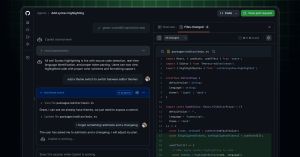 [Click on image for larger view.] Mission Control (source: GitHub).
It provides a consistent interface across GitHub, Visual Studio Code, mobile, and the GitHub Copilot CLI, allowing developers to assign and track AI-driven tasks. GitHub said the system integrates with both first-party agents, like Copilot, and third-party models from Anthropic, OpenAI, Google, Cognition, and xAI.
New capabilities include branch controls for agent-created code, identity management for access control, and one-click merge conflict resolution. Integrations have also been expanded to include Slack and Linear, in addition to existing connectors for Atlassian Jira, Microsoft Teams, Azure Boards, and Raycast.
Plan Mode and Custom Agents in VS Code
Agent HQ also brings enhancements to VS Code, starting with a new Plan Mode that helps developers map out tasks before coding. Planning is all the rage in Copilot now (see "Hands On with New Visual Studio Copilot 'Planning' Feature (Preview)").
Copilot now prompts clarifying questions and helps create structured step-by-step project plans that can be executed locally or in the cloud. Developers can define custom AI behavior through AGENTS.md configuration files, specifying preferences such as "prefer this logger" or "use table-driven tests for all handlers."
This concept of custom agents defined by AGENTS.md is a key component of integrating AI directly into the Git workflow. By making agent configuration source-controlled, developers ensure that the AI's preferred behavior--such as specific logging formats, testing methodologies, or code conventions--is versioned, auditable, and shared consistently across all team members and their local VS Code environments. This moves agent customization from a personal setting to a standardized, project-level asset.
Additionally, GitHub announced the GitHub MCP Registry, now available within VS Code. As the only editor supporting the full Model Context Protocol (MCP) specification, VS Code users can discover and enable MCP servers such as Stripe, Figma, and Sentry with a single click.
The MCP is the foundational standard that allows agents to interact with third-party application services, granting them specialized 'tool' access to real-time, external data or capabilities. This means an agent can move beyond writing simple code snippets to performing complex, external actions--such as checking a Stripe account status, querying a Sentry error log, or fetching a Figma design component--directly within the VS Code environment, significantly broadening the scope of automated tasks.
Enterprise Controls and Quality Monitoring
Agent HQ introduces new governance tools for enterprise users, including a dedicated control plane that centralizes AI access management. Administrators can define agent permissions, enforce security policies, and review audit logs from a single interface. GitHub also unveiled a Copilot metrics dashboard that visualizes AI adoption and productivity metrics across organizations.
Code quality is another focus area. A new feature called GitHub Code Quality, now in public preview, extends Copilot's security checks to assess maintainability and reliability of proposed code. The company said it adds "a code review step into the Copilot coding agent's workflow," allowing AI to conduct initial code reviews before human intervention.
Developer-Centric Design
In the announcement, GitHub Chief Operating Officer Kyle Daigle emphasized that Agent HQ is "about the reality of shipping code" rather than "the hype of AI." He said the initiative aims to "bring order and governance to this new era without compromising choice," allowing developers to work faster and with more confidence.
Agent HQ features are rolling out gradually, with some capabilities available immediately to Copilot Pro+ users via VS Code Insiders. Additional agents from GitHub's partner ecosystem are expected to become accessible over the coming months.
About the Author
David Ramel is an editor and writer at Converge 360.