News
Microsoft Details How 'Agents Took Over VS Code in 2025'
Microsoft detailed how 2025 became the year coding agents took over Visual Studio Code, leading to a unified agent experience that centralizes all AI-driven assistants inside the editor.
In a Nov. 5 VS Code blog post titled "A Unified Experience for all Coding Agents," Burke Holland describes how the company is consolidating management of Copilot, Codex, and other AI tools into a single coordinated system designed to simplify and extend how developers work with coding agents.
"Agents took over VS Code in 2025," he said. "We released agent mode for VS Code, integration for the Copilot coding agent (cloud), and the new GitHub Copilot CLI. But Copilot is not the only agent game in town. There are now more coding agents than ever - including options from OpenAI and Anthropic."
Holland notes that 2025 was defined by the rise of agents throughout the developer ecosystem. GitHub Copilot introduced new modes and workflows early in the year, while OpenAI released GPT-5 and GPT-5 Codex, both of which were integrated into VS Code on day one through the standard model picker. OpenAI also launched Codex as a coding agent available via command line and as a VS Code extension. These developments helped accelerate agent adoption but also created a fragmented landscape for developers juggling multiple tools and subscriptions.
To unify the experience, Microsoft added OpenAI Codex to the GitHub Copilot Pro+ subscription. Developers can now access Codex directly within VS Code without managing a separate OpenAI account. This brings four major agents under one umbrella: GitHub Copilot, Copilot coding agent, Copilot CLI, and OpenAI Codex. To organize them, VS Code introduces Agent Sessions, a new sidebar view that serves as a single control panel for tracking, switching, and managing all active agents--whether local or cloud-based. Each agent runs in its own chat editor tab, allowing developers to monitor progress or make mid-run corrections without restarting an entire workflow.
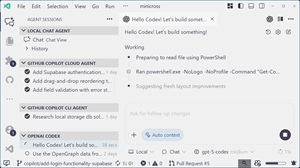 [Click on image for larger view.] Agent Sessions Sidebar in VS Code (source: Microsoft).
The update also redefines chat modes as full agents, reflecting how developers increasingly customize AI behavior. A new built-in Planning agent demonstrates this concept by transforming broad prompts like "add drag and drop" into actionable implementation plans. It asks clarifying questions, recommends libraries, and provides reasoning for each suggestion before execution. Developers can review the plan, hand it off to another agent, or open it in the editor for direct modification. The change emphasizes flexibility while keeping the developer in control of the process.
Another key feature, subagents, introduces isolated environments for handling secondary tasks without cluttering the main context. Developers can launch subagents to research or complete specific code segments, then merge only the results back into the primary chat. This approach supports what Microsoft calls "context engineering"--methods for managing how agents retain, share, and separate information across multiple interactions. Subagents enable deeper exploration while maintaining accuracy and focus in complex, multi-step projects.
Holland concludes that the unified agent experience is just the beginning of Microsoft's effort to make AI collaboration seamless across tools and platforms. The company plans to expand Copilot+ integration to include additional third-party and custom agents while refining context management features introduced this year. The update underscores Microsoft's push toward an ecosystem where developers can freely move between agents, orchestrate tasks, and maintain control over every stage of development--all from within VS Code.
About the Author
David Ramel is an editor and writer at Converge 360.