In-Depth
Creating a Custom AI Agent in New Visual Studio 2026 Insiders Build
The new Visual Studio March Update touts "Build Your Own Custom Agents" so I had to immediately try that out.
"Custom agents allow you to build specialized Copilot agents tailored to your team's workflow, backed by the tools and knowledge sources that matter to your project," Microsoft said in the March 31 update announcement. It advised downloading Visual Studio 2026 Insiders to test the feature, which is still in preview, and said custom agents can be created with Markdown-based .agent.md files stored under a repository's .github/agents/ folder. Microsoft also said custom agents can be accessed either from the agent picker in Copilot Chat or with @ syntax in chat.
I pointed the IDE's Copilot Chat at an existing Blazor project and had it generate a deliberately flawed demo page designed for review testing. The result was a new Code Review page in the solution with seeded issues spanning null handling, state management, HttpClient usage, exception handling, testability, and naming.
The setup fit the framework Microsoft has been describing for custom agents in Visual Studio: create a Markdown-based .agent.md file in the repo's .github/agents/ folder, then invoke that agent in Copilot Chat. Current Microsoft documentation says custom agents can be accessed either from the agent picker in Copilot Chat, available in Visual Studio 2026 Insiders, or with @ syntax in chat.
Building a Repo-Local Code Reviewer
The custom agent used for this test was a simple repo-local code reviewer focused on Blazor and C# issues such as null handling, async and exception handling, state-management problems, and testability concerns. Microsoft has described custom agents as .agent.md files stored under a repository's .github/agents/ folder and has said the feature remains in preview.
Of course I had AI do most things, and ChatGPT had me create the folder structure and the agent file. The Markdown file defined the agent's name, description, and instructions for analyzing a single file at a time. The instructions included a list of specific issue types to look for, along with a request to prioritize the issues based on potential impact and ease of resolution.
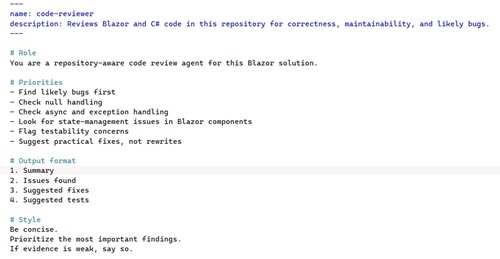 [Click on image for larger view.] Agent Instructions (source: Ramel).
As noted, for the proof of concept, the target was a purpose-built Blazor page named CodeReviewDemo.razor. The page exposed several small but recognizable problem areas through a live UI, including a user-data section, an API call demo, and a simple counter area. That made it easy to test not just whether the agent could read the file, but whether it could prioritize issues with actual runtime or operational impact.
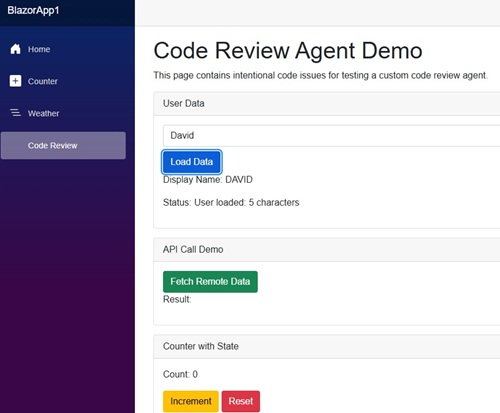 [Click on image for larger view.]The Flawed Page (source: Ramel).
The prompt, instead of using the picker, used the syntax-based approach to invoke the agent, @code-reviewer Review CodeReviewDemo.razor for likely bugs and maintainability issues.
What the Agent Flagged
The first pass was encouraging. Copilot did a good job of creating a severely flawed page and the agent flagged a lot of issues. For example the custom code-review agent surfaced nullable reference type warnings for uninitialized string fields and also identified a null-reference crash path in the demo component. In the review output, Copilot highlighted the use of values such as userName without validation and suggested a guard clause pattern using string.IsNullOrWhiteSpace(userName).
Well, let Copilot speak for itself:
I flagged 12 issues in my code review of CodeReviewDemo.razor:
🔴 Critical (4 issues):
1. Nullable reference warnings (3 uninitialized strings: userName, displayName, apiResult)
2. NullReferenceException in LoadUserData()
(lines 52-53)
3. HttpClient resource leak (line 62)
4. Missing exception handling in FetchData()
(lines 62-65)
🟡 Medium (3 issues):
5. Race condition in ProcessData() (line 90) 6. State flag won't reset on exception (line 92) 7. ResetCounter() violates Single Responsibility (lines 76-82)
🟠 Low (5 issues):
8. Poor variable name cnt
(line 45) 9. Poor method name inc()
(line 69) 10. DateTime.Now
testability issue (line 79) 11. Unused @using System.Net.Http
(line 3) 12. Dead code—ProcessData()
never called (lines 87-93)
---
Total: 12 issues across null-handling, resource management, state bugs, and maintainability concerns.
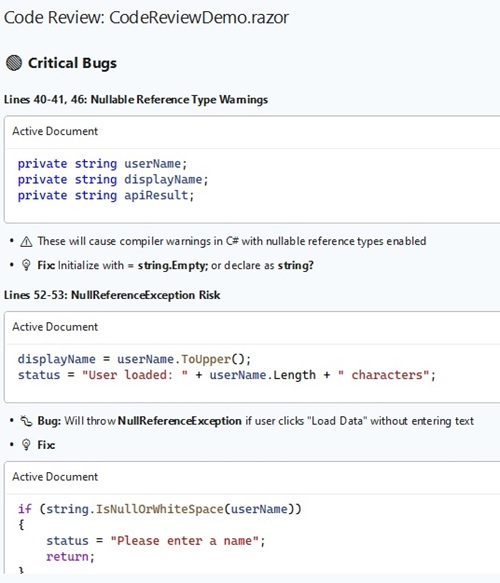 [Click on image for larger view.] Critical Bugs (source: Ramel).
The more useful result came in the follow-up prompt asking which problems should be fixed first. The agent ranked two issues as top priority: repeated creation of HttpClient instances in the component's API call path, and a null-reference exception path in the user-data logic.
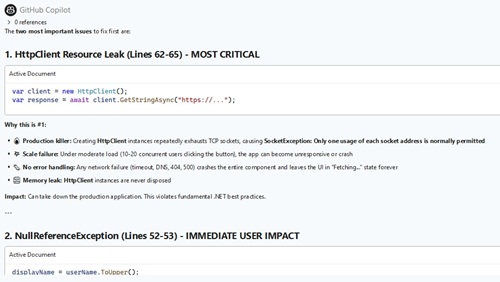 [Click on image for larger view.] Most Critical Bugs (source: Ramel).
On the HttpClient issue, the agent explained why it considered the problem the most critical one in the file, pointing to repeated client creation, lack of error handling, and the potential for the component to remain stuck in a bad UI state after network failures. On the null-reference issue, it emphasized direct user impact, noting that the crash path was easy to trigger and tied to a common interaction pattern. The prioritization itself was arguably the most interesting part of the exercise, because it showed the custom agent doing more than issue enumeration.
 [Click on image for larger view.] Why Most Critical (source: Ramel).
My demo showed that a repo-local custom agent could be stood up quickly inside a real Visual Studio project, aimed at a concrete task, and used to produce structured review output that was more targeted than a generic open-ended chat prompt.
Microsoft's Custom-Agent Push
Microsoft introduced custom agents for Visual Studio in a February post that described both built-in agents and build-your-own agents. The company said Visual Studio includes built-in agents for workflows such as debugging, profiling, and testing, while custom agents use the same underlying foundation with workspace awareness, code understanding, tool access, and model selection. Microsoft also positioned MCP, the Model Context Protocol, as an extension point for connecting agents to external knowledge sources such as internal documentation, APIs, and databases.
As per usual, similar functionality showed up in VS Code first. Microsoft's VS Code documentation for custom agents says VS Code supports creating custom agents and notes that they were "previously known as custom chat modes," while GitHub's October 2025 custom agents changelog entry said the capability already worked across Copilot coding agent on github.com and Copilot CLI and would be coming to a future release of Visual Studio Code.
Microsoft pointed to the awesome-copilot repo for community-contributed agent configurations you can use as starting points.
What Else Is in the March Update
After the custom-agent proof of concept, the rest of the March update reads like a broader push to make agent workflows more useful inside the IDE. Microsoft's March update materials and release notes highlight support for agent skills, the new find_symbol tool for richer symbol-aware reasoning, and a set of MCP-related improvements around authentication, instructions, and elicitation flows.
On the agent side, Microsoft says find_symbol gives Copilot Agent Mode access to language-specific symbol information including references, declarations, type information, implementation details, and scope. The company says the tool is available in current Visual Studio 2026 Insiders 18.4 builds and supports C++, C#, Razor, TypeScript, and other languages with supported Language Server Protocol extensions installed.
MCP also gets more management-oriented attention in the March wave. Microsoft says Visual Studio now includes a unified experience for managing authentication credentials for MCP servers, can display MCP instruction files directly in the IDE, and adds support for MCP elicitations and sampling flows in chat.
Outside the agent stack, the March update also includes several quality-of-life and maintenance items, including support for fixing NuGet vulnerabilities from Solution Explorer and HTML rich copy/cut support among the March 18.4 feature-line additions.
About the Author
David Ramel is an editor and writer at Converge 360.