News
Visual Studio Code 1.117 Expands Copilot Controls for Business and Enterprise User
Following its new weekly release cadence, Microsoft has shipped Visual Studio Code 1.117, an update that puts new emphasis on GitHub Copilot controls for managed organizations while also delivering a range of agent, chat, terminal, and language service updates. The April 22 release is led by new capabilities for Copilot Enterprise and Copilot Business users, especially around model access and administrative control.
The top change in VS Code 1.117 is bring-your-own model key support for Copilot Business and Enterprise users in chat. Microsoft said the release "adds new capabilities for Copilot Enterprise and Business users and further improves the agent experience in VS Code." In practical terms, that means managed users can connect their own model provider keys and use supported external models in chat workflows inside the editor.
According to Microsoft's documentation, the feature is designed to give organizations and users more flexibility in how they work with AI models in VS Code. Supported providers referenced in the release material include OpenAI, Google, Ollama, and OpenRouter. Microsoft also documents that administrators can control access to the capability through policy, making the feature part of the broader managed Copilot experience rather than a user-only toggle.
The BYOK feature does not apply to every Copilot capability. Microsoft documents that it is available for chat scenarios and does not extend to inline suggestions or all other AI-powered features in VS Code. The company also says some Copilot service APIs are still used for tasks such as embeddings, repository indexing, query refinement, intent detection, and side queries, meaning the feature expands model choice without replacing the full Copilot service stack.
That makes the Copilot Business and Enterprise changes the clearest lead item in 1.117. The update gives managed organizations a way to broaden model availability inside VS Code chat while preserving administrative control over whether the option is enabled. For teams evaluating cost, compliance, model preference, or local and external provider options, that is the most consequential addition in this release based on Microsoft's published notes.
Other New Features and Functionality
Beyond the Copilot Business and Enterprise changes, Microsoft used VS Code 1.117 to ship a collection of additional updates across chat, agents, terminals, and TypeScript. Those changes are summarized below.
- Incremental chat rendering: VS Code 1.117 introduces experimental incremental rendering for chat responses. Microsoft says the feature renders responses block by block, with settings for animation and buffering, and is intended to reduce perceived wait time during longer answers.
- Agent session sorting: The Chat view now supports sorting agent sessions by creation time or by last updated time. Microsoft says this is meant to make it easier for users with many sessions to find the conversation they want to resume.
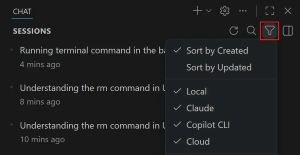 [Click on image for larger view.] Agent Session Sorting (source: Microsoft).
- System notifications in chat for background terminal commands: Long-running background terminal commands can now surface as system notifications inside the chat response. The change is meant to help users track progress without repeatedly switching back to the terminal panel.
- Agents app sub-sessions in Insiders: In VS Code Insiders, the Visual Studio Code Agents app now supports spawning sub-sessions from the current session. Microsoft presents the app as a preview "agent-native environment" for working across repositories and multistep tasks.
- Improved inline change rendering in the Agents app: Microsoft says the preview Agents app includes improved inline rendering of changes. The update is part of a broader round of UX polish in the Insiders-only companion experience.
- Smoother Agents app updates across operating systems: The release notes say the Agents app gets a better update experience across operating systems. Microsoft also notes broader theming and usability work in the preview app.
- Copilot CLI profile support with custom default shells: VS Code now lets users launch the Copilot CLI terminal profile even when their default terminal profile is a non-default shell such as fish on macOS or Linux or Git Bash on Windows. Microsoft says this addresses a prior error where no profile options were provided for the Copilot CLI profile.
- Better terminal titles for agent CLIs: VS Code 1.117 improves terminal title detection for agent command-line tools including Copilot CLI, Claude Code, and Gemini CLI. Microsoft says those tools often appeared under a generic node title before, and the editor now detects those CLIs as a distinct shell type and uses the CLI-emitted OSC title when available.
- Cross-platform terminal detection improvements: Microsoft says the improved agent CLI title handling applies on macOS, Linux, and Windows. The company also documents one exception, noting that Codex is not yet detected on macOS because it does not currently emit an OSC title sequence.
- Configurable terminal title behavior: A related setting lets users toggle the terminal title behavior for supported agent CLIs. That gives teams and individual developers a way to keep or disable the new identification behavior depending on preference.
- TypeScript 6.0.3 included: VS Code 1.117 ships with the TypeScript 6.0.3 recovery release. Microsoft describes it as a minor update that fixes import bugs and regressions, and the VS Code release notes do not provide further detail beyond that description.
About the Author
David Ramel is an editor and writer at Converge 360.