News
Visual Studio Online Finally Enters Public Preview
In the works for six years, Visual Studio Online has entered into a public preview, giving .NET-centric developers a new cloud-powered development option to go along with Visual Studio IDE and Visual Studio Code.
Announced Monday at Microsoft's Ignite 2019 conference in Orlando, the tool was touted for cloud-powered capabilities such as scaling, predictable pay-for-what-you-use pricing and increased computing power, along with multiple tool choices, remote debugging, built-in collaboration and more. The VS Online preview was the lead item in a blog post titled "All Things Developer Tools at Microsoft Ignite," perhaps indicating the importance of the cloud direction to the company.
"Visual Studio Online provides managed, on-demand development environments that can be used for long-term projects, to quickly prototype a new feature, or for short-term tasks like reviewing pull requests," Microsoft said. "You can work with environments from anywhere using either Visual Studio Code, Visual Studio IDE (in private preview), or the included browser-based editor."
It certainly has been a long time in the making, having debuted in our coverage way back in 2013.
VS Online provides its own browser-based editor, but can also work with Visual Studio Code via an extension, and even from the Visual Studio IDE, though the latter scheme is only accessible now via a private preview that requires sign-up.
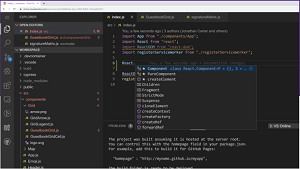 [Click on image for larger view.]
Visual Studio Online
[Click on image for larger view.]
Visual Studio Online
"The Visual Studio 2019 IDE can also create and connect to Visual Studio Online environments and take advantage of all the benefits of a cloud powered development environment to build any application," Microsoft said, listing capabilities including:
-
Get up and running quickly by letting Visual Studio Online install runtimes, SDKs and dev tools
- Create environments quickly to isolate your work across different projects
- Spin up extra capacity with a premium environment to gives you the memory and compute to run your toughest workloads
- Give your teammates a ready to go environment for rich code reviews without tying up your dev box or asking anyone to setup their own environment
Developers use the tool by creating "environments" after signing in and choosing a billing plan. Those environments come with familiar functionality like IntelliCode (AI-assisted IntelliSense for code completion and so on) and Live Share for collaboration. "An environment is the 'backend' half of Visual Studio Online," Microsoft documentation says. "It's where all of the compute associated with software development happens: compiling, debugging, restoring, etc. When you need to work on a new project, pick up a new task, or review a PR, you can simply spin up an Cloud-hosted environment, and Visual Studio Online takes care of configuring it correctly. It automatically configures everything you need to work on your project: the source code, runtime, compiler, debugger, editor, custom dotfile configurations, relevant editor extensions and more."
VS Online borrows heavily from VS Code, especially that editor's remote development capabilities.
"Visual Studio Online conceptually and technically extends the Visual Studio Code Remote Development extensions," Microsoft says in its "What Is Visual Studio Online?" documentation. "As explained in the Remote Development with VS Code blog post, we built Visual Studio Online because 'We saw many developers trying to develop against containers and remote VMs configured with specific development and runtime stacks, simply because it is too hard, too disruptive, and in some cases impossible, to set up these development environments locally. We've all experienced this problem. Unless we feel it's time to flatten that machine, we hesitate to try out a new stack like Rust, Go, Node, or Python3, for fear of 'messing up' our current, well-tuned environment.'"
As of press time today (Nov. 5), the VS Code extension, published the day before, listed 1,595 installations (climbing by the minute) and a perfect 5.0 rating from two developers who reviewed it.
Microsoft provided a bunch of resources to help developers learn more, including:
- Quickstarts:
- How-tos:
- References and Resources:
About the Author
David Ramel is an editor and writer at Converge 360.