News
VS Code Python Updates Include New Jupyter Extension
Since Microsoft went all in on Python for its open source, cross-platform Visual Studio Code editor years ago, the company has steadily been adding new features, tools and functionality, including a brand-new Jupyter extension that will bring Notebook coding support to other languages.
Jupyter Notebooks are interactive constructs (web apps/documents) popularized with Python that may include elements like code, rich text elements, equations, visualizations, narrative text and more, commonly used for data science projects and tasks such as data cleaning and transformation, numerical simulation, statistical modeling, data visualization, machine learning and so on.
Microsoft has steadily been improving Notebook functionality for Python coders in VS Code for a while now, and is now taking it to other languages.
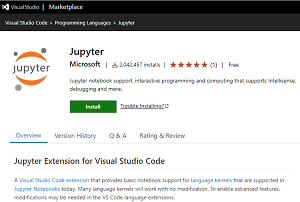 [Click on image for larger, animated GIF view.] The Jupyter Extension (source: Microsoft).
Thus the new Jupyter extension borrows Notebook tech from the super-popular Python extension for VS Code, which at 24.4 million downloads is by far the No. 1 tool in the VS Code Marketplace (No. 2 C/C++ is at 15.3 million).
The idea is to provide a separate tool to help developers use Notebook tech in VS Code with other languages beyond Python including R, Julia and Scala.
"To enable the same rich Jupyter Notebook experience for other languages, we've refactored the Jupyter support out of the Python extension and into the Jupyter extension that we're shipping today," Microsoft said in a Nov. 11 blog post. "This makes it much easier to build new Jupyter experiences for languages beyond Python by taking a dependency on the Jupyter extension, which itself has no dependency on the Python runtime or the Python extension."
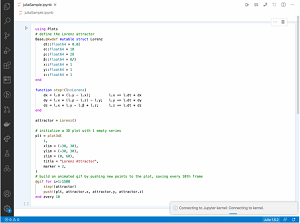 [Click on image for larger, animated GIF view.] A Julia Notebook in VS Code in Animated Action Using the Jupyter Extension (source: Microsoft).
Microsoft said the Jupyter extension will work with many language kernels with no modifications required, but modifications may be needed in the existing VS Code language extensions to enable advanced features.
As of this writing, the Jupyter extension has been downloaded more than 2 million times.
Other improvements to Python in VS Code in the November 2020 update include:
- Updated the logic for parsing and sending selected code to the REPL. This is currently under experimentation, but available in the Insiders Program. (#14048)
- Fixed "TypeError: message must be set" error when debugging with pytest. (#14067)
More information is available at the Python VS Code GitHub site, while the new Jupyter extension's development is carried out on GitHub here. Also available is documentation titled "Working with Jupyter Notebooks in Visual Studio Code."
About the Author
David Ramel is an editor and writer at Converge 360.