News
Microsoft Takes VS Code to the Browser (but No Debugger or Terminal)
You knew it was coming: Microsoft has taken Visual Studio Code to the browser with the new VS Code for the Web, a lightweight version of the super-popular code editor that runs fully online.
You knew it was coming after the debut of Visual Studio Online, which morphed into Visual Studio Codespaces, which then just became GitHub Codespaces under the direction of GitHub, which also introduced the "github.dev" trick that launches a customized VS Code instance in the browser, which can also be done just by pressing the period key in any repo.
So a fully online, browser-based VS Code was sure to come, and it has.
"Now when you go to https://vscode.dev, you'll be presented with a lightweight version of VS Code running fully in the browser," announced the dev team's Chris Dias in an Oct. 20 post. "Open a folder on your local machine and start coding. No install required."
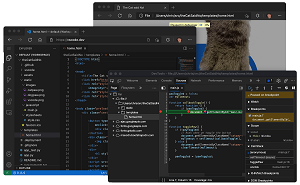 [Click on image for larger view.] VS Code for the Web (source: Microsoft).
Of course, it's described as a "lightweight" version because an online VS Code can't yet match the desktop version in functionality. For example, there's no internal debugging or terminal with VS Code for the Web.
There is local machine file access, however, enabled by the File System Access API. That allows for:
- Local file viewing and editing. Quickly take notes (and preview!) in Markdown. Even if you are on a restricted machine where you cannot install the full VS Code, you may still be able to use vscode.dev to view and edit local files.
- Build client-side HTML, JavaScript, and CSS applications in conjunction with the browser tools for debugging.
- Edit your code on lower powered machines like Chromebooks, where you can't (easily) install VS Code.
- Develop on your iPad. You can upload/download files (and even store them in the cloud using the Files app), as well as open repositories remotely with the built-in GitHub Repositories extension.
While that only works for a couple of modern browsers now -- Edge and Chrome -- those using non-supported browsers can still access local files using browser tooling.
Your mileage may vary with other experiences like code editing and navigation, which in VS Code are driven by programming language services that provide language-specific functionality. The same thing happens with desktop versions, but those language services (and compilers) are designed to work with local resources like a file system, runtime and compute environment.
Variability among those services results in these three levels of VS Code for the Web experiences listed by Dias:
- Good: For most programming languages, vscode.dev gives you code syntax colorization, text-based completions, and bracket pair colorization. Using a Tree-sitter syntax tree, we're able to provide additional experiences such as Outline/Go to Symbol and Symbol Search for popular languages such as C/C++, C#, Java, PHP, Rust, and Go.
- Better: The TypeScript, JavaScript, and Python experiences are all powered by language services that run natively in the browser. With these programming languages, you'll get the "Good" experience plus rich single file completions, semantic highlighting, syntax errors, and more.
- Best: For many "webby" languages, such as JSON, HTML, CSS, and LESS, the coding experience in vscode.dev is nearly identical to the desktop (including Markdown preview!).
Dias acknowledged that VS Code for the Web, announced as a preview, looks a lot like the aforementioned github.dev and explained the difference.
"github.dev is a customized instance of VS Code for the Web that is deeply integrated into GitHub. Login is automatic, the URL format follows github.com's /organization/repo model so that you can simply change .com to .dev to edit a repo, and it is customized for GitHub with the light and dark themes."
While VS Code for the Web isn't as tightly integrated with GitHub, it does tie into GitHub repos and also supports Azure Repos.
"To work with both, VS Code for the Web supports two routes, vscode.dev/github and vscode.dev/azurerepos. You don't have to remember that though, simply prefix whatever URL you have with 'vscode.dev,'" Dias said.
The post goes into detail about all of the above and other aspects of the new offering, such as the extension ecosystem.
"Bringing VS Code to the browser is the realization of the original vision for the product," concluded Dias, who pointed to a video 10-year history of the effort. "It is also the start of a completely new one. An ephemeral editor that is available to anyone with a browser and an internet connection is the foundation for a future where we can truly edit anything from anywhere. Stay tuned for more ...."
About the Author
David Ramel is an editor and writer at Converge 360.