Product Reviews
Manage Database Design with Red Gate SQL Source Control
Red Gate SQL Source Control is a useful tool for SQL Server developers using TFS or Subversion, but falls short in managing database design changes.
Red Gate Software Ltd. has always provided tools for managing SQL Server databases. The company's latest offering is SQL Source Control, which, to quote Red Gate's marketing, promises to "bring all of the benefits of source control to your database." That's not quite true, but it's close enough.
SQL Source Control isn't a standalone tool -- it's actually the intersection between the Red Gate SQL Compare tool and a source-control package, either Team Foundation Server (TFS) or Subversion (SVN). SQL Compare, when given two databases, produces a script that converts one database into a copy of the other. What SQL Source Control brings to the party is a simplified way to generate that delta list and commit it to your source-control system. In many ways, this is how a sophisticated source-control package works -- it stores the changes from one version to another.
With your database changes under source control, you can replace a database with one of the versions stored in source control. You can also view all the history of changes made to the database, when they were made and who they were made by. Using an SVN bug or TFS work item, you can also associate a database change with a bug-tracking system -- for example, TFS or Fogbugz.
However, to fully embrace the "database changes as source control" paradigm, I'd expect to be able to do more -- to create forks in my database design, for instance. You don't get that, at least not directly. Also, SQL Source Control doesn't so much roll your database design forward or backward as replace the current version with your selected version. That's too bad, but for the price you pay (about $700 for SQL Compare plus SQL Source Control) you'll save the equivalent time on your next version release.
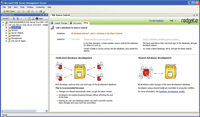
[Click on image for larger view.] |
| Apply changes from source control to your database structure and review the history of those changes from SQL Server Management Studio. |
You must install SQL Source Control on a computer with SQL Server Management Studio (SSMS) or SSMS Express 2008.
SQL Source Control
Red Gate Software Ltd.
Web: red-gate.com
Phone: 866-997-0397
Price: $295
Quick Facts: Integrates other Red Gate products into one of two popular source-control tools
Pros: Integrates with SQL Server Management Studio to provide simple source control for database design changes
Cons: Not a complete source-control management tool; only directly supports replacing versions of a database with a version from your source-control system
About the Author
Peter Vogel is a system architect and principal in PH&V Information Services. PH&V provides full-stack consulting from UX design through object modeling to database design. Peter tweets about his VSM columns with the hashtag #vogelarticles. His blog posts on user experience design can be found at http://blog.learningtree.com/tag/ui/.