News
VS Code 1.122 Lets BYOK Work Without GitHub Sign-In
Microsoft released Visual Studio Code 1.122 on May 28 with the latest weekly update led by a change that lets developers use bring-your-own-key AI language models without signing in to GitHub.
The update changes a previous requirement for developers using their own language model API keys in VS Code. In the VS Code 1.122 release notes, Microsoft said BYOK now works without GitHub sign-in, making it available for air-gapped or restricted environments where signing in is not possible. The company also said the change enables fully offline workflows with local models such as Ollama.
Microsoft's release notes explained developers now "can use chat, tools, and MCP servers in air-gapped or restricted environments where GitHub sign-in isn't possible."
Developers can get started by running Chat: Manage Language Models
from the Command Palette and adding a provider. The providers named in the announcement are Anthropic, Azure, Gemini, OpenAI, Ollama, OpenRouter or a custom endpoint. After at least one BYOK model is configured, Microsoft said the Chat view becomes available and sign-in prompts are suppressed.
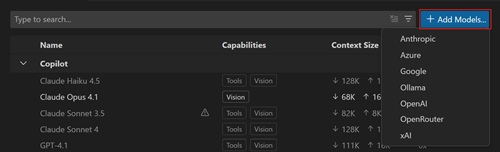 [Click on image for larger view.] Add Model (source: Microsoft).
Microsoft's separate language model documentation says VS Code lets developers switch models for chat, inline suggestions and utility tasks, and add more models by bringing their own API key. The same documentation says built-in providers require an API key and, depending on the provider, other configuration details such as an endpoint URL.
An important boundary for the feature: "Inline suggestions and next edit suggestions (NES) still require a GitHub sign-in." Microsoft said BYOK powers chat, tools and MCP servers only.
Requests go directly to the provider. Built-in tools and configured MCP servers continue to work.
Utility Models Need Separate Configuration While Signed Out
VS Code uses smaller utility models for some workflows, including chat title generation, commit message generation and feedback. Microsoft said those default utility models normally come from a Copilot subscription. When BYOK is used while signed out, the default utility models are unreachable, so VS Code shows a notification in the chat input asking the user to point utility tasks at one of the BYOK models.
The user can select Configure
and choose BYOK models for the chat.utilityModel
and chat.utilitySmallModel
settings, which Microsoft said unlocks the full set of AI features using the user's own language model. The user can also dismiss the notification when only chat is needed. In that case, utility-driven features remain inactive until a model is configured.
The notification hides automatically after both utility settings are configured, after the user signs in to GitHub, or after all BYOK models are removed.
Custom Endpoint Provider Reaches Stable
The release also moves the Custom Endpoint provider to VS Code Stable. Microsoft said the provider lets developers connect models that implement Chat Completions, Responses or Messages APIs, enabling chat with self-hosted, enterprise or other compatible AI endpoints.
The custom endpoint documentation says the provider replaces the deprecated OpenAI Compatible provider and supports additional API types. The documented setup flow uses the Language Models editor, the Add Models
command and a Custom Endpoint selection. After developers enter a group name, display name, API key and API type, VS Code opens chatLanguageModels.json for additional model configuration.
Microsoft also added more granular BYOK provider group actions in the Language Model editor. Supported provider groups can expose targeted actions such as Update API Key, Add Model, Rename Group and Delete. The stated purpose is to handle small provider maintenance tasks without opening and editing the full JSON configuration by hand.
Agents Window Updates Continue
VS Code 1.122 also continues Microsoft's work on the Agents Window, which remains in preview. Microsoft describes the Agents Window as a dedicated VS Code window for an agent-first workflow. It is optimized for orchestrating higher-level tasks across projects, with chat and the sessions list as the primary interface.
The 1.122 release adds session hover details in the session list. Hovering over a session now shows the session title with an icon for the harness used, along with the project, worktree and files changed. The update also continues work on the local VS Code harness, which Microsoft said is available only in VS Code Insiders and can be enabled with the sessions.chat.localAgent.enabled setting.
Users can now run Chat: Manage Language Models
directly from the Agents Window to configure language models used there. The same flow supports BYOK models. Microsoft said model configuration is shared with the editor window, so changes made in either place are reflected in both.
For additional context, Visual Studio Magazine
previously published a hands-on look at the Agents Window in VS Code 1.120. That article said the feature moved agent work into a separate window designed around sessions, prompts, customizations and review workflows. It also noted the title-bar button used to open the Agents Window and described how sessions, customizations and changes are presented inside the new surface.
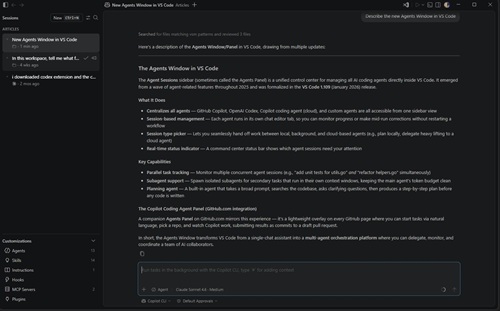 [Click on image for larger view.] The Agent Window Describes Itself (source: Ramel).
VS Code 1.122 also adds richer OpenTelemetry signals for agents. Local agent sessions now emit a canonical github.copilot.*
attribute namespace that matches GitHub Copilot CLI OpenTelemetry conventions. The new signals add repository context, agent type, structured tool parameters and hook outcomes to each session. OpenTelemetry has been gaining traction in VS Code and elsewhere (see "The Rise of OpenTelemetry in Microsoft Dev Tooling"). Microsoft's OpenTelemetry monitoring documentation says Copilot Chat can export traces, metrics and events, giving visibility into agent interactions, LLM calls, tool executions and token usage.
Integrated Browser and Issue Reporting Also Updated
The integrated browser now includes device emulation support. Microsoft said the feature includes screen sizes, mobile and touch emulation, custom user agents and related capabilities for testing website responsiveness and behavior from inside VS Code. Developers can start from a browser tab by selecting Show Emulation Toolbar from the overflow menu.
VS Code 1.122 also adds the ability to attach a screenshot of the current browser viewport to chat as context. Microsoft said the feature is intended for UI-related tasks such as debugging a layout issue.
The editor experience received an updated issue-reporting flow. Microsoft said the new issue-reporting wizard guides users through creating higher-quality VS Code issues directly from the editor, including relevant details, screenshots and video recordings. Users can opt in with the issueReporter.wizard.enabled setting.
For remote development, Microsoft's linked release notes for Remote Development extensions identify one highlight: VS Code 1.122 is the last release that supports running prebuilt servers on 32-bit ARM Linux hosts. Starting with VS Code 1.123, users will need a supported x86_64 or ARM64 Linux host for remote development.
About the Author
David Ramel is an editor and writer at Converge 360.