Practical .NET
Calling Stored Procedures from Entity Framework
Even in a Code First environment, you can call a stored procedure from a DbContext object. But it's a lot easier if you use the visual designer.
I frequently get asked if Entity Framework (EF) in a Code First environment supports calling stored procedures. The short answer is: "In EF6 -- which works everywhere -- the answer is Yes." As I discuss in my article on Entity Framework 6, you can even tell EF to use your stored procedures to handle updates, deletes and inserts triggered when you call your DbContext object SaveChanges method. And that's cool.
But what the people asking this question really want is the ability to call any stored procedure whenever they want to, and to do it from the DbContext object without messing with connections or parameter objects. You can do that in one of two ways: let the EF Designer generate code for you, or write some code yourself. Which option to use depends on your personal coding style, and whether your stored procedure just performs some action or returns some result. In this column, I'm going to assume your stored procedure just "does something," and you're only interested in whether it succeeds or fails.
Using the Designer
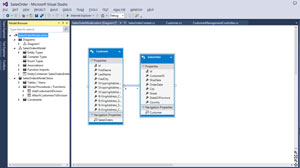
The easiest way to work with stored procedures that perform an update is to use the EF Designer: Just select Add | New Item and, in the Add New Item dialog, pick the ADO.NET Entity Data Model. As you work through the wizard, pick Generate From Database on the first screen and select the stored procedures you want to use on the third screen. When finishing the wizard, you'll have something like the view in Figure 1. In the Model Browser that appears on the Designer's left, you can see two stored procedures I selected while running the wizard.
 [Click on image for larger view.]
Figure 1. The EF6 Designer Includes a Tree View that Lists All of Your Model's Resources
[Click on image for larger view.]
Figure 1. The EF6 Designer Includes a Tree View that Lists All of Your Model's Resources
If you realize you want to use some other stored procedure after adding the Designer, just right-click in the Model Browser and select Update Model from Database. A new wizard will guide you through adding any new stored procedures you want. You can, of course, create a new stored procedure in Visual Studio Server Explorer, but you'll still need to add to your model using Update Model from Database.
Regardless of when you add your stored procedure, the Designer will add code like this to the DbContext object it writes for you:
public virtual int AddCustomerInDivision(Nullable<int> CustId, string Division)
{
  var CustIdParameter = CustId.HasValue ?
    new ObjectParameter("CustId", CustId) :
    new ObjectParameter("CustId", typeof(int));

  var DivisionParameter = Division != null ?
    new ObjectParameter("Division", Division) :
    new ObjectParameter("Division", typeof(string));

  return ((IObjectContextAdapter)this).ObjectContext.ExecuteFunction(
    "DeleteCustomer", CustIdParameter, DivisionParameter);
}
Using the Code
To call this method, all you need is code like this:
SalesOrdersEntities soe = new SalesOrdersEntities();
if (soe.AddCustomerInDivision(123, "West") == 0)
{ //...handle failure...}
The method generated by the EF Designer discards any result returned by the stored procedure, and returns the number of records affected by the stored procedure (which is why my sample code uses a return value of zero as a flag that something's gone wrong).
You could add an ADO.NET Data Model to your project just to hold code to work with stored procedures (in which case, don't include tables from your database as I did in Figure 1). Alternatively, you could use the Designer to generate the code for you, copy the Designer's code into your own DbContext class, then delete the Designer when you're done (after adding a stored procedure to an existing Designer, you might need to save your project to get the Designer to generate your code). But if you really, really don't want to use the Designer, you could use my sample code as a template and add the method yourself to your Code First DbContext object.
These are all excellent strategies if you're either going to be calling this stored procedure frequently, or don't care about the result returned from the stored procedure. However, these solutions are probably overkill if you're only going to call the stored procedure in one place in your application. And these techniques won't work for you at all if your stored procedure is returning a result to which you want access. I'll cover the techniques to handle those scenarios in a future column.
About the Author
Peter Vogel is a system architect and principal in PH&V Information Services. PH&V provides full-stack consulting from UX design through object modeling to database design. Peter tweets about his VSM columns with the hashtag #vogelarticles. His blog posts on user experience design can be found at http://blog.learningtree.com/tag/ui/.