Practical .NET
Switch Back to the Web Forms Editor for Static HTML
You lose some functionality with the default editor in Visual Studio 2013. Here's how to quickly switch back and get the functionality you were used to.
In Visual Studio 2013 the default editor for static HTML pages loses a lot of useful functionality compared to the default version used in Visual Studio 2012 and earlier.
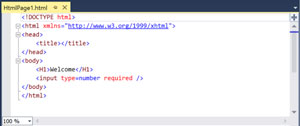
In Figure 1, notice that XHTML violations such as uppercase tag names, unquoted attribute values, and attribute minimization are not shown as warnings. Also note the lack of a WYSIWYG experience option.
 [Click on image for larger view.]
Figure 1: Default HTML Editing Experience in Visual Studio 2013
[Click on image for larger view.]
Figure 1: Default HTML Editing Experience in Visual Studio 2013
To enable a better experience -- including the ability to automatically validate the mark-up, switch between validation schemas, and switch to a WYSIWYG design view -- follow these steps:
- In Solution Explorer, right-click any HTML file
- Choose Open With...
- Select HTML (Web Forms) Editor
- Click Set as Default
- Click OK
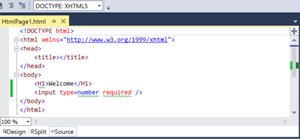
You'll notice in Figure 2, you get it all back.
 [Click on image for larger view.]
Figure 1: The HTML Editing Experience Using the HTML (Web Forms) Editor
[Click on image for larger view.]
Figure 1: The HTML Editing Experience Using the HTML (Web Forms) Editor
Now, that's more like it!
About the Author
Mark Price, MCT, MCSD, is a full-time trainer for UK-based Firebrand Training. He has more than 20 years of experience working in the IT and developer industry, including a two-year stint working at Microsoft. His expertise covers a number of Microsoft technologies (Azure, ASP.NET Web Forms and MVC, Web API, WCF, jQuery, C#, LINQ, Entity Framework, WPF, and Windows Store apps), HTML5, XAML, and Google developer technologies and the Google App Engine.