News
Tweak Away: Visual Studio 2017 Color Theme Editor Arrives
New 2017 version builds on the popular 2012 tool, which was installed more than 640,000 times.
Visual Studio developers love to tweak their IDEs so they look just right and are very finicky about their choices -- just look at the fuss that met Microsoft's decision to switch to ALL-CAP menus.
Now, with the popular color theme editor used in previous versions coming to the latest 2017 release, those choices have expanded, with a nearly limitless number of tweaks that can be made.
The Visual Studio 2017 Color Theme Editor is now available as a free extension on the Visual Studio Marketplace. Just having been launched last Friday, it has 745 installs (and counting quickly) and a perfect 5.0 rating from six reviewers.
Microsoft developer Matt Johnson explained how to use the popular VS 2012 color-changing tool in a 2012 appearance on Microsoft's Channel 9 video service. "People like to change colors, and I think the download numbers show that for both the 2010 version and the 2012 version," Johnson said at the time.
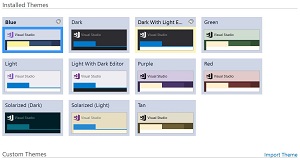 [Click on image for larger view.] Stock Themes in Visual Studio 2017 Color Theme Editor (source: David Ramel).
Whether the VS 2017 version rivals the success of the Visual Studio 2012 Color Theme Editor (640,704 installs, 4.3 rating from 233 reviewers) remains to be seen, but the new offering comes with features such as:
- Import and upgrade themes from Visual Studio 2015
- Added support for new Visual Studio 2017 features - including Start Page and Developer News
- Easily rename custom themes
- Preview text color and background combinations in the theme editor before applying the theme
- Choose from several prebuilt themes including a Light theme with a dark editor, a Dark theme with a light editor, two themes based on Ethan Schoonover's Solarized color palette, and four additional colored themes (Red, Green, Tan, Purple)
- Ability to copy/paste, undo/redo, and multi-select editcolor values
- A new and improved color picker to easily change your theme’s colors
- More Visual Studio UI that can be modified including most tool window backgrounds and selection colors
- Customize your editor colors from the theme editor UI
- Copy colors from existing themes to easily create variations on the prebuilt themes
- Import and export themes to share themes across multiple machines or with friends
Microsoft's Greg Duncan agreed in a Channel 9 blog post published today to announce the 2017 version.
"Dev Humans are weird," Duncan said. "Some will spend hours and days tweaking the colors of their IDE, making their perfect theme, and some are just fine with the default themes (and let's not even bring up the Light vs Dark topic...).
"If crafting the perfect theme is your thing, you'll be very happy to know that the Visual Studio 2017 Theme Editor is finally available. Start your theme tweaking engines!"
About the Author
David Ramel is an editor and writer at Converge 360.