News
Developer Seeks to Bring Visual Studio IDE Code Search up to Level of VSTS, TFS
A new Visual Studio extension seeks to improve the IDE's internal code searching ability to match the experience available in Visual Studio Team Services and Team Foundation Services.
The Code Search - Visual Studio Text Editor extension, authored by Mike Parks earlier this month, was called out with high praise by Greg Duncan in a Microsoft Coding4Fun blog post this week.
"If you've ever used VSTS/TFS Code Search, you'll probably loved it, it felt like this was the way code searching should be. Then you did a code search in Visual Studio, and were reminded of the painful past...." Duncan wrote.
Parks explained the reasoning behind his extension -- available in the Visual Studio Marketplace -- in his own post earlier this month.
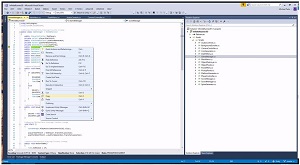 [Click on image for larger, animated GIF.] Visual Studio Code Search (source: Mike Parks).
He lauded the Code Search capability in VSTS and TFS, explained in this April post, but he sought to improve the functionality that required exiting the IDE.
"The only downside I stumbled upon was the interruption of stopping my coding flow working inside Visual Studio, opening a new Chrome tab, navigating to the Code Search Web page, then copying/pasting or typing in the keyword I wanted to search for which usually already existed in the code base I was working on from the Visual Studio Text Editor," he said.
"To work around this, I created the Code Search - Visual Studio Text Editor Extension. This extension allows you to use Microsoft's Code Search directly from the Text Editor in Visual Studio by highlighting text and clicking the Code Search context menu option."
Prerequisites to use the extension include TFS 2015 or higher, Visual Studio 2015 or 2017 and installation of the VSTS/TFS Code Search extension.
The new VS code search extension from Parks has 373 installs as of this writing, with two reviews averaging out at 4.5 stars out of 5. The source code is available on GitHub.
However, at least one developer doesn't share the same enthusiasm for VSTS/VTS Code Search as do Parks and Duncan.
Here's the sole comment on Duncan's post, from "Vitoc":
Am I the only person that has had a terrible experience in VSTS code search? It often comes up with zero results because it has decided to include (put checkmarks next to) only the projects that didn't include that search term in them. I have to go and manually click the checkbox next to the projects that did have matching results to see any code from the results. If that weren't bad enough I've found if I don't include a "*" wildcard after the search word/phrase it often won't find what I was looking for. As a result, I find myself not trusting the web search and frequently pulling down the code in VS and navigating through stuff there. :(
I know others have had a much better experience and use that as their go-to. Not sure if it's something I have done or not done.
About the Author
David Ramel is an editor and writer at Converge 360.