News
New Visual Studio 2017 Preview Round Starts, Improving Debugging, More
Just one day after Visual Studio 2017 15.4 graduated into production, Microsoft announced a new preview round: v15.5.
One focus of the new preview is debugging, with the introduction of IntelliTrace "step back" capability that lets developer traverse backward through a series of snapshots that are generated for each breakpoint that was set.
The debugging of live Azure App Service projects is also enhanced with the introduction of Snappoints and Logpoints.
With little impact to end users visiting the site, Microsoft said, Snappoints capture a snapshot of an app's state while it runs, while Logpoints enable devs to insert new on-the-fly logging statements in an app.
Under the performance category, Microsoft listed: quicker loading of large .NET C# and Visual Basic solutions; better quality of generated C++ code; other compiler optimizations; and more.
Productivity is said to be enhanced through various means for: C# (new quick actions and code suggestions); ASP.NET Web apps (rearranged project creation menu items to improve discoverability); Team Explorer Git functionality; and more.
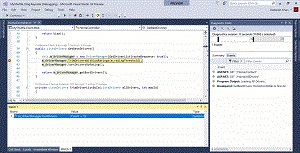 [Click on image for larger animated GIF.] Step-Back Debugging in Action (source: Microsoft).
Other improvements concern connected services such as WCF client code generation for .NET Core-based projects and easier installation of Connected Service Providers for Azure Storage.
The Xamarin Live Player functionality for developing cross-platform mobile apps is also getting some attention, with the ability to see XAML UI updates instantaneously on a device as developers type -- or switch between XAML documents in the IDE.
One new feature sure to annoy at least some developers is the introduction of colorful icons. "Based on feedback, we re-introduced colorized icons to the toolbox and view menu," Microsoft said in a blog post yesterday. "This change will help you be better able to swiftly scan and identify the function you need. The use of color within function icons especially important for dense, high complexity apps like Visual Studio that make extensive use of iconography in the UI." Typically, any changes to the Visual Studio UI that concern colors, icons, typography or just about anything else are met with heated resistance from some finicky coders.
More information on all of these changes and others can be seen in the release notes.
About the Author
David Ramel is an editor and writer at Converge 360.