News
XAML Controls Gallery Teaches Fluent Design for Windows 10 UWP Apps
Microsoft is showing off its Fluent Design System across apps built for all Windows 10-based devices with the new XAML Controls Gallery that provides interactive samples built with the XML-based markup language.
The "XAML Controls Gallery (aka XamlUiBasics)" GitHub project is part of a larger collection of samples published to highlight capabilities of Universal Windows Platform (UWP) apps that can run on any implementation of Windows 10.
In this case, the samples can be used to learn about the Fluent Design System, described by Microsoft as "an eloquent design system for a complex world." That complex world can include smartphones, tablets, desktop PCS, laptop PCs, Surface Hub devices and more, all with different screens and input methods.
To make UWP apps that look good and function properly on all those devices, the Fluent Design System provides guidance, materials, styles, templates, tools and other building blocks used to create UIs. For example, it demonstrates use of the Acrylic material designed to help coders add depth to their screens with a Brush that creates a partially transparent texture. The app also includes item pages, item templates, page headers, search results pages, AppBar toolbars, borders, buttons, data inputs and many more.
The GitHub project's app showcases those UI control building blocks in conjunction with the Windows Style Guide.
Specifically, Microsoft said, the XAML Controls Gallery demonstrates how to:
- Specify XAML controls in markup: Each control page shows the markup used to create each example.
- Implement a basic layout: This sample will show all of the possible layout options for an app and allow developers to interact with the panels to show how to achieve any layout they're looking for.
- Create an adaptive UI: In addition to showing how each control responds to different form factors, the app itself is responsive and shows various methods for achieving adaptive UI.
It does those things by providing links within the app to let developers easily and quickly access the relevant documentation on Microsoft's MSDN site. However, to use the app, developers need to use Visual Studio 2017 to build the app and Windows 10 to run it. Another requirement listed by the project is Windows Server 2016 Technical Preview.
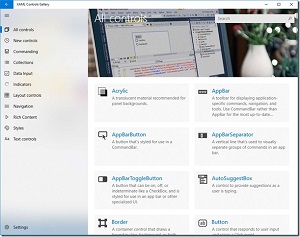 [Click on image for larger view.] XAML Controls Gallery (source: Microsoft).
According to a Coding4Fun blog post, techniques taught by the app include: creating proper layouts that make it easy to navigate through an app and that look good on different devices and screen sizes; the use of styles to define the "personality" of an app via color, typography and motion; providing better usability by making apps inclusive and accessible to people around the world; and more.
Coincidentally, Microsoft last month announced long-awaited improvements to the XAML Designer tool built in to the Visual Studio IDE.
About the Author
David Ramel is an editor and writer at Converge 360.