News
VSTS Adding More Programming Languages for 'Azure DevOps Projects'
Azure DevOps Projects, introduced several months ago and powered by Visual Studio Team Services, is getting closer to emerging from its public preview as the VSTS team continues to add functionality, including support for more programming languages.
Azure DevOps Projects are intended to help developers greatly ease the process of creating and running their applications in the Azure cloud with a few steps: select a programming language/framework, runtime and an Azure service on which to run the application.
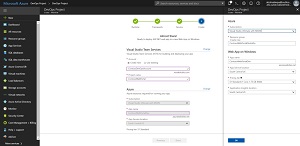 [Click on image for larger view.] The Steps for Starting an Azure DevOps Project (source: Microsoft).
Microsoft says the key benefits of DevOps Projects include:
- The ability to get up and running with a new app and a full DevOps pipeline in just a few minutes
- Support for a wide range of popular frameworks such as .NET, Java, PHP, Node and Python
- Start fresh or bring your own application from GitHub
- Built-in Application Insights integration for instant analytics and actionable insights
- Cloud-powered CI/CD using Visual Studio Team Services
Regarding that latter item, the VSTS roadmap indicates key functionality for the Devops Projects initiative is being addressed in the first quarter of this year, of which we're more than halfway through. According to the VSTS roadmap, the team is working on providing DevOps Projects with support for the Go and Ruby programming languages, among other enhancements.
Along with Go and Ruby support, the Q1 roadmap indicates the team is working on unspecified virtual machine (VM) functionality, having earlier (in the Feb. 14 update) provided the ability to deploy ASP.NET apps to VMs using an Azure DevOps Project.
Here's what Microsoft had to say about that ASP.NET functionality:
You can now use an Azure DevOps Project to setup a fully-configured CI/CD pipeline to Azure Virtual Machine (VM) resources for ASP.NET or ASP.NET Core applications. The DevOps Project sets up everything you need for developing, deploying, and monitoring your app on the VM.
By creating a DevOps Project, an Azure VM is provisioned and comes with a Git code repository, Application Insights integration, and a continuous delivery pipeline. The dashboard then lets you monitor code commits, builds, and deployments from a single view in the Azure portal.
For developers who want to explore Azure DevOps Projects while still in preview, Microsoft has provided five-minute quickstarts for working with:
Additionally, step-by-step tutorials are available for:
Microsoft apparently hasn't indicated when Azure DevOps Projects will emerge from preview.
We first reported on Azure DevOps Projects along with a slew of other announcements emerging from Microsoft's November 2017 Connect conference. At the time, we described it as "A complete DevOps pipeline running on Visual Studio Team Services, Azure DevOps Projects is available in the Azure Portal in preview. It's aimed at making DevOps the 'foundation' for all new projects, supporting multiple frameworks, languages and Azure-hosed deployment targets."
About the Author
David Ramel is an editor and writer at Converge 360.