News
Low-Code Web Template Studio 2.0 Ships for VS Code Full-Stack Web Apps
Microsoft shipped Web Template Studio 2.0, a wizard-driven Visual Studio Code extension for quickly creating a foundation for a full-stack Web app.
The open source project created by Microsoft Garage interns is similar to Windows Template Studio, which targets native Universal Windows Platform (UWP) app development with the low-code approach.
"Our philosophy is to help you focus on your ideas and bootstrap your app in a minimal amount of time," said Lea Akkari, a program manager intern on the Garage team in an announcement post. "We also strive to introduce best patterns and practices."
Improvements have been made throughout the v2.0 project, which leads developers through a series of steps in which they choose a project type, front-end and back-end frameworks, page types and cloud services to get the app rolling.
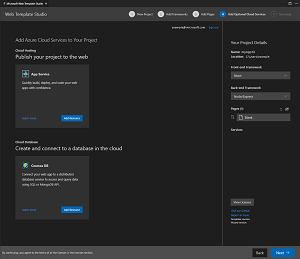 [Click on image for larger view.] Web Template Studio 2.0 (source: Microsoft).
Microsoft has consistently emphasized the community approach to the project, soliciting contributors, feature requests and other feedback. Here's a roundup of some of the new features as presented in the step-by-step workflow:
Project Name and Save To destination: These are now automated, and the dev team has added a Quick Start pane to offer advanced users a single view of all wizard-driven steps, enabling new project generation in only two clicks.
- Choose a framework: Angular and Vue support has been added to join the previously available React.js front-end framework, while the Flask back-end framework joins Node.js as an option.
- Add pages to a project: This workflow has been redesigned for a smoother experience, and available app page templates used to add common UI pages to a project now include blank page, grid page, list and master detail.
- Cloud services: V2.0 now includes the new App Service for cloud hosting, joining the previously available Azure Cosmos DB service for storage.
- Summary and Create Project page: This has also been redesigned so developers can see project details in a right-side bar, letting them quickly make changes to a project before it's created.
Finally, to run an app, Akkari said: "Click the 'Open project in VSCode' link. You can open up your README.md file for helpful tips and tricks and then, to get the webserver up and running. To run your app, you just need to open the terminal then type 'yarn install' then 'yarn start' and you’re up and going! This generates a Web app that gives you a solid starting point. It pulls real data, allowing you to quickly refactor so you can spend your time on more important tasks like your business logic."
Web Template Studio development is carried out on GitHub under an MIT license, where the project shows 894 stars, 30 contributors and 71 forks.
In the Visual Studio Code Marketplace, the preview project has been installed more than 11,800 times (51,522 downloads), earning a perfect 5.0 rating from nine developers who reviewed it.
For comparison, when we first wrote about Web Template Studio in May, the GitHub project had 31 stars and the marketplace entry had 84 installations with one 5.0 review.
About the Author
David Ramel is an editor and writer at Converge 360.