News
Xamarin Details iOS Fix to 'Prevent App Store Rejection'
Microsoft published guidance for iOS mobile developers using Xamarin.Forms to avoid potential App Store rejection caused by the deprecation of Apple's UIWebView component.
The UIWebView component debuted in iOS 2.0 but was deprecated in iOS 8.0 in favor of the new-and-improved WKWebView.
After some warnings of the deprecation to developers, Apple on Dec. 23, 2019, advised: "The App Store will no longer accept new apps using UIWebView as of April 2020 and app updates using UIWebView as of December 2020." The company strongly encouraged developers to update to WKWebView "for improved security and reliability."
An issue on the topic was filed on the Xamarin.Forms GitHub repo way back in August 2019, and the Xamarin.Forms team just announced a fix.
It involves some technical machinations to get the iOS linker to work with Xamarin.Forms, which by default was ignored by the linker. The Xamarin.iOS team helped achieve that, but the functionality is hidden behind a feature flag for now until the team is sure everything works correctly.
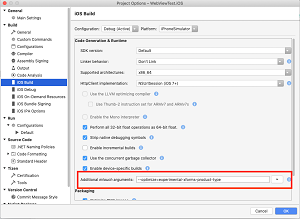 [Click on image for larger view.] Setting the Flag in Visual Studio for Mac (source: Microsoft).
In the meantime, to "Prevent App Store Rejection, Today!" developers using Xamarin.Forms are advised to:
- Use the right versions of Xamarin.Forms and Xamarin.iOS.
- Add a flag to the build configuration.
- Build and submit your app to the App Store and celebrate!
"On the Xamarin.Forms side we also had to make some changes to make all this work correctly," said software engineer Gerald Versluis in a Feb. 10 blog post. "These new changes are part of Xamarin.Forms 4.5, including the pre-releases. Make sure that you are using the Forms 4.5 or newer NuGet package in your projects. You also need to make sure that you are using Xamarin.iOS 13.10.0.17. You can check this from Visual Studio. This version of Xamarin.iOS is included with Visual Studio for Mac 8.4.1 and Visual Studio 16.4.3 and up." Once all that is in order, a flag needs to be set (see figure above).
"This setting can be applied per build configuration so make sure that you put it in the right one. That will probably be the iPhone/Release build configuration which is typically used for distribution builds," said Versluis, who pointed to more information in the documentation.
About the Author
David Ramel is an editor and writer at Converge 360.