News
Microsoft Open Sources Unity Analyzers
Microsoft has open sourced homegrown analyzers that the Visual Studio Tools for Unity team developed to enhance gaming development in Visual Studio.
Visual Studio comes with a Unity download because ever since Unity 2018.1 shipped, Visual Studio is the default C# script editor for Unity. While Unity comes with its own editor for creating game worlds, for example, it isn't used for writing code, so Visual Studio Tools for Unity helps coders use the IDE to develop cross-platform games and apps.
Earlier this month, Microsoft announced that its homebuilt analyzers are open source, available on GitHub, where the project is described as providing "Visual Studio with a better understanding of Unity projects by adding Unity-specific diagnostics or by removing general C# diagnostics that do not apply to Unity projects."
Analyzers examine the syntax and structure of code and detect incorrect practices that can be addressed via suggested fixes. Thus an analyzer and related code fixes are packaged together in a single project. The functionality of code analyzers and fixes comes from the Roslyn compiler, which can programmatically guide developers when using an API.
"At the core of this experience, an analyzer detects a code pattern, and can offer to replace it with a more recommended pattern," explained Jb Evain of the Visual Studio Tools for Unity team.
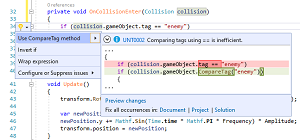 [Click on image for larger view.] A Tag Comparison Fix (source: Microsoft).
As a simple example, the post describes how a CompareTag diagnostic will detect inefficient tag comparison code that uses the "==" equality operator and prompt a developer to use the more optimized CompareTag method instead, as depicted in the graphic above.
Eleven other analyzers tackle problems ranging from "Incorrect message signature" to "Unused coroutine return value."
Other functionality recently introduced can suppress Roslyn's default analyzers, which lets Unity developers remove warnings or code fix suggestions that aren't applicable to Unity. Thus eight diagnostic suppressors are also available at the preceding link.
One warning about those, though: "The analyzers are running inside Visual Studio, meaning that if you suppress a warning you might still see it in Unity's error list. We're working on improving this for a future release."
The Unity Analyzers are now being shipped as part of the Tools for Unity and are enabled on Visual Studio and Visual Studio for Mac.
About the Author
David Ramel is an editor and writer at Converge 360.