News
Visual Studio Online Tweak Aids Remote Development Surge
With developers primarily working from home amid the COVID-19 pandemic, preview functionality in Visual Studio Online helps .NET coders connect more easily with home machines during the remote work surge.
Visual Studio Online provides cloud-powered development environments accessible from a browser-based editor or through support for Visual Studio Code and the Visual Studio IDE.
Microsoft recently published guidance about the new ability to connect home computers to the service via the cloud, rather than from within VS Code itself. The guidance comes in an April 9 blog post titled "Bring your own machine to Visual Studio Online."
The cloud connection functionality lets developers register their own computers from within VS Code or the web editor.
"If you only had SSH access or didn't want to install and setup RDP, cloud-connecting your machine with Visual Studio Online was simply impossible," Microsoft said.
That changed with the preview release of a command-line interface (CLI), which is documented in guidance published last week.
"This is a great option for developers that want to cloud-connect an already configured work or home machine for anywhere access, or take advantage of the Visual Studio Online developer experience for specialized hardware we don't currently support," Microsoft said. "We've made several improvements to streamline the self-hosted registration process and expand supported scenarios."
The post details how to connect from Windows via PowerShell, or other means for macOS or Linux computers.
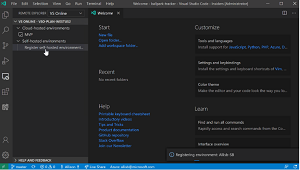 [Click on image for larger, animated GIF view.] Registering a Self-Hosted Environment in Visual Studio Code in Action (source: Microsoft).
The connection process from within VS Code is also updated, as the Visual Studio Online extension provides a one-click registration experience, shown in the animated graphic above.
Developers can update the Visual Studio Online extension (preview) to use the new functionality, with more information about self-hosted environments available here.
About the Author
David Ramel is an editor and writer at Converge 360.