News
VS Code Python Update Tweaks Interpreter Path Functionality
The May 2020 update of Visual Studio Code's Python extension -- by far the most popular tool in the marketplace -- is mostly routine with a lot of fixes and minor tweaks, though developers showed interest in changes to interpreter path functionality.
For one, the new update provides the ability to browse for an interpreter path in order to help developers select or change interpreters -- or enter it manually.
This functionality dates back to November 2017 in an issue opened by Python guru Don Jayamanne, who originally created the extension and then was scooped up by Microsoft as part of its effort to go all in on Python for VS Code, which has been cited as the No. 1 development tool in major surveys.
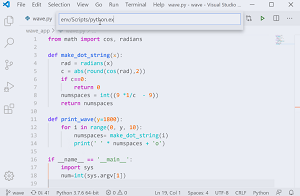 [Click on image for larger, animated GIF view.] Interpreter Selection in Animated Action (source: Microsoft).
But that's not all of the "pathiness" coming up for VS Code, as an upcoming change will move python.pythonPath out of the settings.json configuration file, which can cause issues when workspace settings are shared, such as in a GitHub repository. This coming change prompted some comments from developers.
This issue dates back to July 2018:
Be default, a local pipenv environemnt is searched for and if found, is marked as the python interpreter. But it also then adds a line to settings.json indicating the path for the virtual environment which can cause issues for configs shared among a team. The python.pythonPath variable will not be constant for each user working on the repo (eg "python.pythonPath": "/home/daniel/.local/share/virtualenvs/ontariofresh_backend-NQNAEc6t/bin/python", note my home directory in the path) and thus prevents the settings.json file from being committed to the remote repository.
Ideally, it would behave just as it does now, but just implicitly sets the python interpreter as the one found without explicitly writing it out to settings.json.
As detailed in a May 12 announcement post by Luciana de Melo e Abud, program manager, the way the extension handles Python interpreter selection will be changed. "In order to make the interpreter information system agnostic and prevent sharing the interpreter path (which commonly won't be the same across different machines), we're going to deprecate the python.pythonPath setting in the Python extension," she said.
To be introduced gradually as an experiment, the new functionality can be accessed by opting in via User settings.
Some developers commented on the path changes:
I am just adding my .vscode directory to .gitignore anyway. Why should we share IDE settings in a repository? Weird change but I guess there is some use case.
pythonPath is perfect for everyone who uses venv instead of pipenv and it works with WSL on Windows.
I don't agree that discontinuing interpreter configuration in vscode config is useful. You can already apply it in user settings instead of project. Adding it to the project is just an option that people can easily skip.
In total, the May 2020 update addresses 42 issues, including 23 bug fixes, all of which are listed in the changelog.
The Python extension in the VS Code marketplace is nearing 20 million installations, earning an average 4.4 rating (scale to 5) from 314 developers who reviewed it. The second-most-popular item, C/C++, is at about 11.3 million installations.
About the Author
David Ramel is an editor and writer at Converge 360.