News
What's New in Visual Studio Code 1.48 (July 2020 Update)
The July 2020 release of Visual Studio Code, or version 1.48, is out with the usual bevy of improvements in accessibility, the workbench, source control, debugging and more. Here's a capsule summary of what's new:
- Settings Sync to Stable -- Settings Sync is now available for preview in stable. This feature lets developers share their VS Code configurations such as settings, keybindings, and installed extensions across machines so they are always working with their favorite setup.
- Updated Extensions view menu -- Simplified menu with additional filtering options. The Extensions view filter actions are now displayed under a separate filter action (funnel button). Also, the Extensions view Views and More Actions (...) menu has been refactored for better organization of extension queries (such as Installed or Recommended) and other actions like Check for Extension Updates and Enable All Extensions.
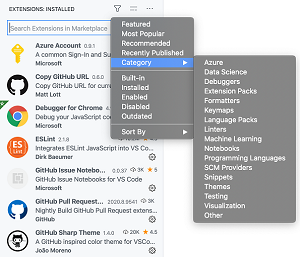 [Click on image for larger view.] The Extensions view filter actions are now displayed under a separate filter action (funnel button) (source: Microsoft).
- New Git View submenus -- Refactored overflow menu for Git in the Source Control view. A new submenu proposed API powers the refactoring of the Git View and More Actions (...) menu for better organization of several commands.
- Updated in-browser debugging -- Debug in the browser without writing a launch configuration. A new Debug: Open Link command has been added to quickly debug any URL, whereas before, developers had to install the Debugger for Chrome extension and write a launch.json config file to debug a page. With the new command, developers can debug any URL without requiring additional launch configurations.
- Publish a public repository -- Choose whether to publish to a public or private GitHub repository. Developers can now make the repository public, as opposed to the previous private default, when publishing a repository to GitHub.
- Notebook UX updates -- New Cell menu, enhanced drag and drop. In its continuing effort to improve native support for Notebooks, the VS Code team created a GitHub Issue Notebooks extension -- in preview -- that helps developers search GitHub issues and pull requests. Using this preview requires using VS Code Insiders early-access builds. Also, dragging a collapsed Markdown cell will now move all nested cells inside the folding region.
-
New Remote Container topics -- These include:
- Java lightweight mode -- Start working with your Java source files more quickly. The Language Support for Java extension now provides a lightweight mode to help developers quickly work with their Java source files while still leveraging language features such as code completion, navigation, outlining, and syntax checking for source code, as well as the JDK.
More information can be found in the Aug. 13 announcement post.
About the Author
David Ramel is an editor and writer at Converge 360.