In-Depth
Using Local AI to Cut Copilot Usage-Based Billing Shock
The idea sounded straightforward enough. If GitHub Copilot is getting more expensive under usage-based billing, maybe some of that work can be pushed onto local models instead. Not everything, obviously. I was not trying to replace autocomplete or pretend a laptop-hosted model was going to become Claude overnight. The question was narrower and more practical: could a local model handle some lower-risk coding-assistant chores well enough to keep me from burning through Copilot credits?
That question came directly out of the sticker shock I described in Copilot Billing Shock Hits Developers, where I documented how GitHub Copilot's June 1 move to usage-based billing left me and many other developers watching routine prompts and agent-style workflows chew through monthly AI credits much faster than expected.
By the end, the answer was more specific than the question I started with. Local AI did not look like a magic Copilot escape hatch. It looked more like a pressure valve. The occasional tiny prompt probably is not where the real savings are. The more plausible case is shaving off repeated low-risk work -- summaries, first-pass reviews, small bug triage -- while saving Copilot for the places where its speed, workspace awareness and lower hassle still justify the credits.
In my tests, that pressure valve had a clear local front-runner: Phi-4 14B through Ollama. It was not as smooth as Copilot, but it was the local setup that most consistently crossed the line from interesting experiment to something I could imagine using for limited real work.
The Nuthsell: Is this Concept Practical or Not?
I did my testing in VS Code using the Foundry Toolkit extension, which hooks into the Microsoft Foundry system, including a Model Catalog and Model Playground. For the record, I have a personal Azure subscription and a personal GitHub Copilot Pro subscription, but they didn't figure that heavily into all the varied testing I did and I tried to remove them from this equation as much as possible.
As reality check, I asked several different AI systems about the feasibility and practicality of using local AI models to defray increased usage-based GitHub Copilot costs, and then I asked another AI system to synthesize all the answers into one sentence. It replied:
Using local AI models through Foundry Toolkit, Foundry Local, Ollama or similar VS Code integrations is a practical way to reduce some Copilot usage-based costs for lower-risk chat, summary, triage and simple coding-assistant tasks, but it is only a partial mitigation strategy because local models still face hardware, speed, quality and workflow-integration limits, while many higher-value Copilot features remain tied to GitHub-hosted services and metered cloud usage.
The Clean Baseline
To test that, I used a small JavaScript todo app I had already built as a repeatable benchmark project. It has a browser UI, localStorage persistence, a Node test suite and one intentional bug in a stats function.
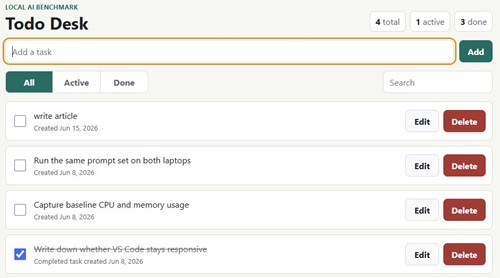 [Click on image for larger view.] Todo Desk App (source: Ramel).
Line 62 in a function in the todoStore.js file counts incomplete todos as completed because it filters on !todo.completed
instead of todo.completed.
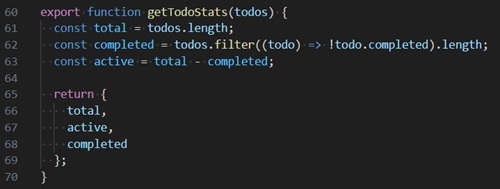 [Click on image for larger view.] Code Bug (source: Ramel).
That bug became the first gate. If a local model could not correctly identify and fix one obvious line in a tiny reproduction, there was not much point pretending it was ready to take on broader Copilot-style work.
Because I have a low-powered company laptop that mixes with local AI like oil and water, I did the bulk of the testing on my personal gaming laptop.
Below are screenshots of the two systems themselves so readers can see the hardware gap before looking at the model results. The Omen test machine has an Intel Core i7-14650HX, 32 GB of RAM and an NVIDIA GeForce RTX 4060 Laptop GPU with 8 GB of VRAM. The Dell work laptop is much more modest, with an 11th Gen Intel Core i5-1135G7 and 12 GB of RAM. That side-by-side view matters, because part of this project is not just whether a model answers correctly, but what kind of machine it takes to get there.
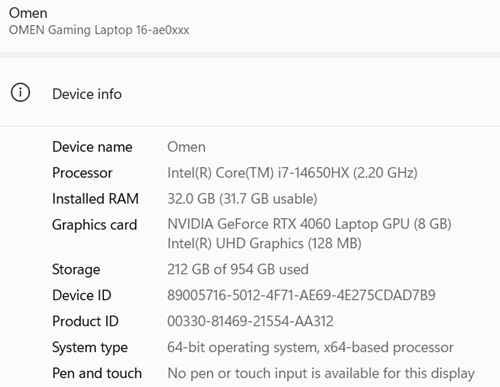 Personal Omen Gaming PC (source: Ramel).
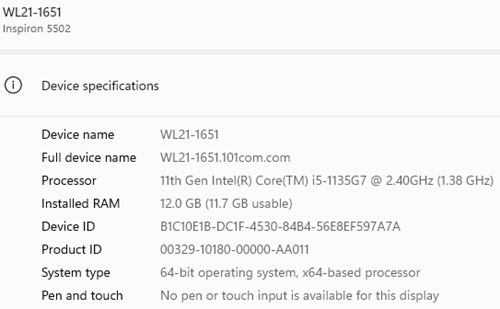 Company Dell PC (source: Ramel).
On my Omen laptop I confirmed the expected baseline: four passing tests and one intentional failing test. The failure was in getTodoStats, where completed todos were being counted backward. That gave me a stable starting point and, more importantly, a small objective task instead of a vague "help me code" prompt.
Before testing the models, I ran the project's Node test suite with npm.cmd test and confirmed the expected baseline: four tests passed and one intentionally failed, giving each model the same known bug to diagnose.
This article kind of builds on my earlier Visual Studio Magazine
piece, Going Local (& a Bit Loco) with Open-Source AI in VS Code, where I documented just how rough local AI could get on the Dell. That earlier round established the floor: on a modest work laptop, local AI could be made to run, but it often felt more like endurance training than a practical daily workflow. I actually bought the Omen gaming system after that terrible experience to avoid pulling my hair out just waiting all night for a prompt response that may or may not materialize when working with local AI models. The Omen tests in this article are really the follow-up question: what happens when the hardware is no longer the obvious weak link?
A couple newer Dell benchmark results reinforced that point rather than rescuing it. On the puny work laptop, a tiny CPU-based local Qwen model was not just slower than the Omen runs. It was also less dependable, hallucinating project details, missing the obvious getTodoStats bug, and sometimes falling apart on larger prompt attempts. On one test that involved examining five files from the test project, it just failed completely.
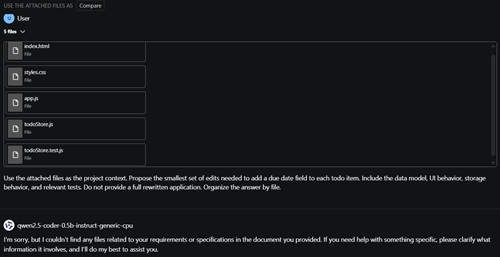 [Click on image for larger view.] 'I'm sorry...' (source: Ramel).
That made the Dell useful as a baseline warning, but certainly not as a convincing case for day-to-day local AI.
The results made more sense once I stopped looking for one universal winner. Among the local models, there was a clear standout: Phi-4 through Ollama. The small local models were cheap but shaky. Some bigger local runs were smarter but slow enough to test my patience. One model was fast and confidently wrong. Phi-4 through Ollama was the first setup that felt like it might actually earn a spot in the workflow. Copilot, annoyingly enough, was still the thing that felt most like a coding assistant instead of a side project.
| Model/Runtime |
Task |
Result |
Approximate Time |
Takeaway |
| Foundry qwen2.5-coder-0.5b |
Local coding help |
Loaded |
Fast enough to try |
Small and light, but not especially trustworthy. |
| Foundry qwen2.5-coder-7b-instruct-cuda-gpu |
Tiny bug prompt |
Timed out |
Roughly 16 minutes |
Technically loadable after repair, but not practical in this setup. |
| Ollama Qwen3:8b |
Tiny bug prompt |
Correct |
About 2 minutes |
First local setup to clear the basic bug-fix hurdle. |
| Ollama Qwen3:8b |
Five-file project summary |
Mostly grounded |
About 13 minutes |
Capable, but painfully slow. |
| Ollama gemma3:4b |
Tiny bug prompt |
Wrong |
About 13 seconds |
Fast, confident and wrong. |
| Ollama phi4:latest |
Tiny bug prompt |
Correct |
About 17 seconds |
Best local balance in the tests. |
| Ollama phi4:latest |
Read-only project summary |
Mostly grounded |
About 16 seconds |
Fast enough to feel useful, though still not perfect. |
| GitHub-hosted GPT-4.1 |
Tiny bug prompt |
Correct |
Under 2 seconds |
Very fast, but hosted usage brings its own billing and quota questions. |
| Copilot |
Five-file project summary |
Correct |
About 20 seconds |
Smooth, fast and workspace-aware. |
| Copilot |
Tiny bug prompt |
Correct |
About 13 seconds |
Worked well, but moved the usage meter. |
Foundry on Windows: More Drama Than Progress
My first serious attempt was with Microsoft Foundry on Windows. This is where things got messy fast. The tiny qwen2.5-coder-0.5b model still loaded, but it had already shown earlier that it was fast and not especially trustworthy. The more interesting test was a larger model, qwen2.5-coder-7b-instruct-cuda-gpu.
That turned into a miniature forensic exercise. Foundry Toolkit had path issues, missing runtime DLLs and a bunch of background noise that looked scary but was not always relevant. Some of the log output came from catalog throttling, some of it came from unrelated Phi model checks, and some of it turned out to be the actual blocker: missing CUDA runtime dependencies inside the VS Code extension's runtime folders. After copying the missing files into place, the 7B model finally loaded.
That sounds like progress, but only on paper. The model load itself took about 22 seconds, which is not wonderful but still survivable. The real problem came when I gave it the tiny bug prompt. It sat there generating for roughly 16 minutes and eventually timed out. In other words, I got past the install problem only to run into a practical usability problem.
If I am being fair to Foundry, that result is still meaningful. The model was not broken in the abstract. It was technically loadable after repair. But in this setup, it was not usable enough to serve as a realistic Copilot substitute. A model that answers after a quarter of an hour, or not at all, is not saving me from billing shock so much as introducing a different kind of pain.
Ollama Qwen Did Better, But It Was Uneven
The first genuinely promising result came from a different stack: Qwen3:8b through Ollama. I gave it the same tiny bug prompt and, after about two minutes, it returned the correct answer. No hallucinated database, no invented API, no bizarre side quest about unrelated code. Just the right line, the right replacement line and a reasonable one-sentence explanation.
That made it the first local model/runtime combination in this experiment to clear the simplest hurdle that actually mattered. So yes, local AI finally did something useful. But it did not feel cheap in any ordinary sense of the word. It was "cheap" only if the comparison point was cloud token billing, because locally the machine was paying in RAM, CPU and responsiveness.
Then things got more interesting. I tried another Ollama model, gemma3:4b, on the same benchmark. On the project-summary prompt it answered in about 44 seconds, which was dramatically faster than Qwen3:8b. But on the tiny bug-fix prompt it answered in about 13 seconds and fixed the wrong line. That made it a useful counterexample: a local model could feel much faster and still be less trustworthy.
The catch is that gemma3:4b was not perfectly grounded either. Its summary mostly described the app correctly, but it also slipped into benchmark framing and made the project sound as if it directly contained the metrics machinery I was using around it. That matters. A model can be fast enough to feel usable and still be loose enough with the evidence in the files to create cleanup work. And on the bug prompt, gemma3:4b showed the other half of the problem: it was quick, confident and wrong.
The clear local winner in this project was phi4:latest through Ollama, which corresponds to the Phi-4 14B model family. On the tiny bug prompt it answered correctly in about 17 seconds. On the read-only summary prompt it answered in about 16 seconds and stayed mostly grounded in the attached files. That does not make it perfect, and it still leaned on the README's benchmark framing, but it was the first local model in this project that felt both reasonably quick and broadly useful across more than one task.
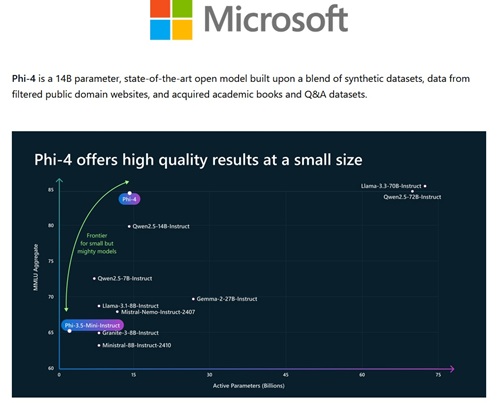 [Click on image for larger view.] Phi-4 (source: Microsoft).
On a larger pasted code sample from a real Blazor app, Phi-4 14B stayed respectable. It took about a minute to review the component and identify the main issues, then about 15 seconds to produce a focused fix for the highest-priority null-handling problem. That was encouraging from a pure model-capability standpoint. The catch was that I had to paste the code manually, because the supposedly repo-aware local workflow in VS Code would not reliably expose the right project files to the model at all.
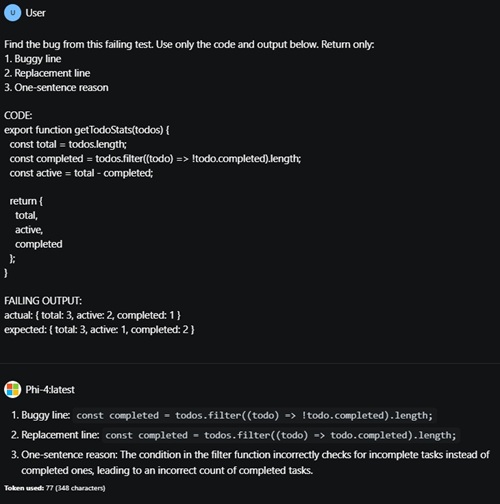 [Click on image for larger view.] Phi-4 14B Finds the Answer (source: Ramel).
Even though that worked fine, with a tolerable response time, the inability for the model to access and edit workspace project files like Copilot can is a major drawback. If you save big bucks working this way on a much more involved project, that might be worth it. Remember, some of those developer complaints and projected monthly costs for Copilot usage-based billing were shocking.
The Resource Cost Was Hard to Ignore
While the Ollama-backed models were running, Task Manager looked like a warning label. At one point the AI Toolkit Inference Agent was using about 6.1 GB of RAM and around 24% CPU, while llama-server was using another 2.6 GB of RAM. VS Code itself was sitting at roughly 1.34 GB. System memory was already around 82%.
Then, during a later run, it got even heavier. The AI Toolkit Inference Agent climbed to about 7.4 GB of RAM, llama-server was near 5.2 GB, VS Code stayed around 1.35 GB, total memory usage reached about 87%, and CPU hovered around 40%.
| Process / Metric |
Earlier Local Inference Run |
Later Heavier Run |
| AI Toolkit Inference Agent RAM |
6.1 GB |
7.4 GB |
| llama-server RAM |
2.6 GB |
5.2 GB |
| VS Code RAM |
1.34 GB |
1.35 GB |
| Total system memory utilization |
82% |
87% |
| Approximate CPU utilization |
24% |
40% |
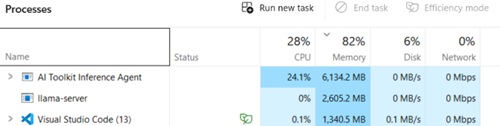 [Click on image for larger view.] Task Manager Shows Local AI Inference Pushing System Memory to 82% (source: Ramel).
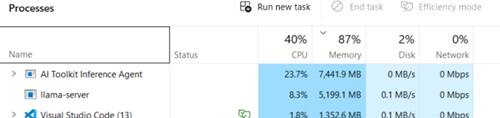 [Click on image for larger view.] Task Manager Shows Active Local AI Generation Pushing System Memory to 87% (source: Ramel).
That is the part of the local-AI conversation that can get lost when people talk only about monthly charges. Yes, local models can help you avoid per-request cloud billing. But they do not make the cost disappear. They move it. On this machine, the bill showed up as memory pressure, system load, long wait times and a development environment that felt less like an assistant and more like an ongoing negotiation.
One important caveat: I am using "local AI" here to mean models actually running on the laptop, such as the Ollama runs and the local Foundry-on-Windows experiments. That is different from Azure-hosted Microsoft Foundry Models, where inference can fall under a cloud billing or quota model. In other words, Ollama shifted the cost to my machine; hosted Foundry shifts it back toward the cloud ledger.
More Resources Did Not Automatically Mean Better Results
I also captured Foundry's own resource charts for two Qwen runs, and the contrast was pretty stark. The tiny qwen2.5-coder-0.5b model looked relatively cheap to run. Its memory footprint stayed modest, CPU use was low most of the time, and the overall graph looked light. The bigger qwen2.5-coder-7b-instruct-cuda-gpu model was clearly in a different class, with much higher sustained memory use and much more dramatic utilization spikes.
That matters because it undercuts the simple assumption that spending more local hardware automatically buys a better experience. In this case, the 7B model looked much more expensive for the machine to run, but in the Foundry setup it still was not the one that delivered the practical win. The small model was cheap but weak. The larger Foundry model was heavy but still timed out. The local improvement only started to look real when I changed both the model and the runtime stack.
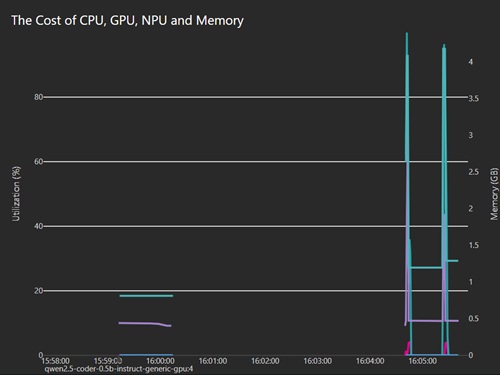 [Click on image for larger view.] Qwen 0.5B Cost Profile (source: Ramel).
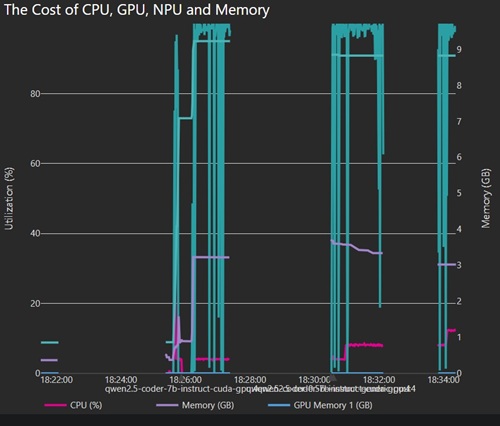 [Click on image for larger view.] Qwen 7B Cost Profile (source: Ramel).
Qwen Could Summarize the Project, Eventually
After the bug-fix test, I moved on to a read-only summary prompt with five attached project files. The Ollama-backed Qwen3:8b did finish, and the answer was mostly grounded in the project. It identified the app as a JavaScript todo project, mentioned localStorage, filtering, editing and deletion, tests, and the known failing test. That is much better than the smaller models, which had a habit of inventing frameworks and backend features that were never there.
But it took about 13 minutes to get there, and the generation itself was visibly slow. It looked like text arriving in painful little bursts, almost character by character toward the end. That likely reflects the same thing Task Manager was already screaming about: the model was alive, and even capable, but the local stack was under enough pressure that every token felt expensive in a non-billing sense.
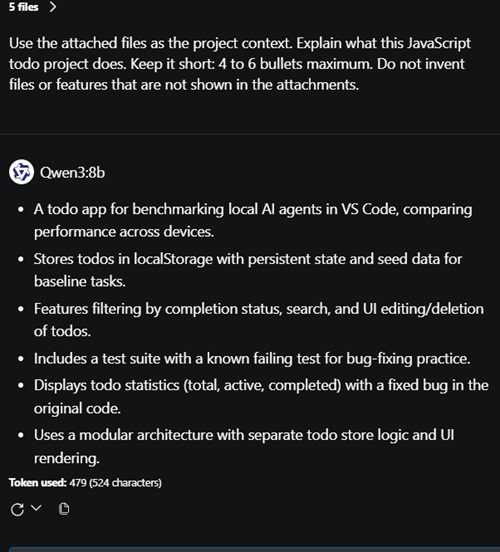 [Click on image for larger view.] Qwen 8B Project Summary (source: Ramel).
I would not call that summary perfect. It drifted a little into article framing by describing the app as a benchmark for local AI agents in VS Code, which in this case is at least supported by the README, but it still shows how much these models like to smooth rough edges into broad narratives. Compared to the earlier tiny-model hallucinations, though, the better local runs were clear upgrades. The bigger lesson is not simply "local AI fails" but "local AI depends heavily on the exact model and runtime stack."
What Local AI Can Probably Take Off Copilot's Tab
The testing left me with a narrower and more believable conclusion than I started with. Local AI does not look like a broad Copilot replacement. But it does look capable of taking on some of the lower-risk work that can still burn credits under usage-based billing. A decent local model can help with short project summaries, first-pass bug triage, small fix suggestions and other read-mostly or narrowly scoped tasks where speed matters less than cost control and a human is going to review the answer anyway.
What still looked weak, even on the better local runs, was the high-trust side of coding help. Fast answers were not always right. Right answers were not always fast. Multi-file reasoning could drift. Longer prompts could bog down the machine or the runtime. Even worse, "local AI in VS Code" did not automatically mean a smooth repo-aware coding assistant. In my setup, some local model workflows could not reliably browse and attach the right files at all. There may be more elaborate local setups involving repo-ingestion plugins or retrieval layers, but by that point the experiment starts drifting away from the simple promise many developers actually care about: can I run a local model in my editor and have it work as smoothly as Copilot? In my testing, the answer was no. That means local AI is best thought of as a selective pressure valve, not a complete escape hatch. It may blunt the edge of Copilot billing shock for some chores, but it does not erase the need for a stronger hosted model when the task is more complex, time-sensitive or error-prone.
So Is Local AI a Copilot Escape Hatch?
At least on this machine, not in the simple, triumphant way local-AI boosters sometimes imply. I would not say local AI failed outright. That would be too blunt. The local results were all over the map. Qwen3:8b got the small bug task right and produced a mostly solid project summary, but it was painfully slow. gemma3:4b was much faster, but it confidently fixed the wrong line. Phi-4 14B via the phi4:latest Ollama tag was the first local model to land in a more believable middle ground, giving me correct output on the bug task and a decent summary in a timeframe that felt much closer to normal human patience.
The more honest conclusion is that local AI is possible, but the tradeoff is harsher than the marketing makes it sound. You may avoid cloud charges on some tasks. In exchange, you might end up tying up a lot of RAM, waiting much longer for responses, and making your machine noticeably less pleasant to use while the model works. Even when the local speed is finally good enough, you still have to ask whether the answer is grounded enough to trust. The good news is that the answer was not a flat no. On this machine, the right local model did begin to look viable for limited, low-risk work.
That does not make local AI useless. It just makes it situational. If you are careful about the task, patient about latency, and willing to spend local resources instead of cloud credits, there is something here. But if your goal is to replace the convenience of Copilot with something that feels equally smooth, the answer still looks shaky -- unless maybe you have a mainframe or something.
Where This Left Me
The hosted-model comparison clarified the tradeoff even more. One hosted path through Foundry hit 429 rate limits before it produced any answer at all, which was its own kind of friction. But a GitHub-hosted GPT-4.1 run answered the same tiny bug prompt correctly in under two seconds. That made the contrast hard to ignore. The cloud model did not burden the laptop the way the local stacks did, and it was both faster and more reliable than the local models I had tested so far.
While the cloud-hosted models might perform vastly better, they do come with a cost, as I have an Azure subscription and a bunch of resources on Microsoft Foundry, as I mentioned, and I also have a company OpenAI subscription for working with ChatGPT models. So I don't know where that GPT-4.1 usage could be billed. I spent hours trying to understand Azure/Foundry billing and usage sites -- with the help of several AI systems, and I just couldn't do it. That might well be the most obtuse, confusing site from a major tech vendor I have ever seen.
Then I tested Copilot itself on the same prompts. That turned out to matter a lot. Copilot answered the five-file project-summary prompt in about 20 seconds and the tiny bug prompt in about 13 seconds, getting both right. It was not the single fastest model I touched, but it was comfortably fast and reliably correct. That is exactly what makes usage-based billing sting. Replacing Copilot is possible in pieces, but matching its combination of speed, convenience, and dependability is harder than simply running a model locally.
That mattered when I checked the Copilot meter. The two small Copilot tests moved my usage from 1,468 credits to 1,472, while the more realistic Blazor review-and-fix sequence pushed it to 1,481. In other words, the tiny prompts appeared to cost 4 credits total, while the two more substantial Blazor prompts appeared to cost another 9.
Those numbers did not make local AI look like an obvious workaround for every little question. If anything, they suggested the opposite: the occasional tiny prompt probably is not where the big savings are. The stronger case is repeated medium-complexity work -- summaries, reviews, debugging, triage and fix-it prompts -- where a capable local model could keep some routine requests off the Copilot tab over time.
That does not automatically make the hosted path the obvious winner, because the cost side was harder to pin down than I expected. Hosted-model usage is generally billable, but in my testing the billing trail was much murkier than the performance trail. Small prompt activity did almost show up immediately in the GitHub AI usage page, but like I said, I could find absolutely nothing about usage or billing in the Azure and Foundry views I checked, which made cost attribution impossible. I have no idea if I'm still using initial free credits or the charges haven't shown up yet or what. It's like Microsoft engineered things to make such observations impossible.
So no, local AI did not give me a clean Copilot escape hatch. It gave me something messier and probably more useful: a way to think about which prompts are worth spending credits on.
For the occasional tiny question, the savings case looked weak. Copilot answered quickly, got the answer right, and only moved the meter a little. For repeated summaries, first-pass reviews, small bug triage and other low-risk chores, the case gets better. Those are the places where a local model does not have to be better than Copilot. It just has to be good enough, often enough, to keep some of that routine work off the tab.
That still leaves Copilot with the higher-value work: the prompts where speed matters, project context matters, and getting a grounded answer with less setup friction is worth the credits. That is not the triumphant local-AI story I might have hoped for, but it is a usable one. Local AI is not the escape hatch. It is the pressure valve.