News
Microsoft Updates 'Must Have' Xamarin Community Toolkit
The Xamarin Community Toolkit provides all kinds of effects, views and helpers to complement mobile app development with Microsoft's recently released, open source, cross-platform Xamarin.Forms 5.
The kit includes new features, gadgets and gizmos contributed from the open source community and from Microsoft, which creates experimental features during development iterations that are subsequently moved to the toolkit. For example, while announcing Xamarin.Forms 5 last month, Microsoft noted that the C# UI, Expander and MediaElement experimental features had been or were going to be moved into the Xamarin Community Toolkit.
They join a host of animations, validators, converters, extensions and more.
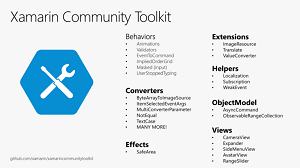 [Click on image for larger view.] Xamarin Community Toolkit(source: Microsoft).
"Members of the community are rebooting this library under the guidance of the Xamarin team," says the project's GitHub site. "The Xamarin Community Toolkit is a collection of common elements for mobile development with Xamarin.Forms that people tend to replicate across multiple apps. It simplifies and demonstrates common developer tasks when building apps with Xamarin.Forms."
Microsoft's Gerald Versluis, Software Engineer II for Xamarin.Forms, described the kit as "your Xamarin.Forms Swiss army knife."
His Jan. 25 blog post explains more about the kit, which joins Xamarin.Forms proper and the complementary Xamarin.Essentials, the latter being -- as the name suggests -- essential APIs that mostly focus on mobile (iOS, Android, UWP) applications.
"One of the toolkit's goal is to gather as many of those behaviors, converters, and effects that you keep copying from one project to another," he said. "We want to aggregate all of these into a single package so it will become your one-stop library that has it all. But why stop there? The Toolkit will also be a place where you can find brand new controls. Some of them come from PRs to Xamarin.Forms that couldn't be included in the main package, some our controls maintainers donating their controls, and some are just brand-new things!"
The kit contains all of the features discussed here and in his post except for C# UI Helpers, which now only comes in a standalone package.
The toolkit's NuGet site shows 17,753 total downloads as of this writing. More information is available in the documentation and a sample app.
About the Author
David Ramel is an editor and writer at Converge 360.