News
Azure Static Web Apps Goes GA
Call it low-code for the web: Azure Static Web Apps has reached general availability, providing a quick onramp to full-stack projects with static front ends and dynamic back ends powered by Azure Functions serverless computing.
The project, announced in preview during Microsoft's 2020 Build conference, lets developers use a variety of front-end frameworks or site generators to create the static, customer-facing component of a full-stack web app. To simplify the process, the turnkey service provides pre-built and pre-rendered static pages. To even further simplify things, no server work is required, as dynamic back-ends can be created via serverless computing, namely Azure Functions, in which code blocks are typically executed in response to actions or events. Yet even more simplification is provided with a Visual Studio Code extension, still in preview.
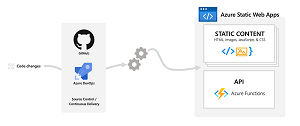 [Click on image for larger view.] Azure Static Web Apps (source: Microsoft).
What's more, continuing on the low-code theme, authentication and authorization functionality is baked in with a free, fully managed, automatically renewed SSL certificate. Apps can also be hooked into DevOps schemes like GitHub and Azure DevOps.
While Azure Static Web Apps started out with a strictly JavaScript focus, Blazor support was added in September 2020, allowing C#-based projects.
Thus the gamut of more than two dozen front-end frameworks that can be used to create static web pages includes: Angular, React, Svelte, Vue, Blazor, Flutter and so on. The graphic below shows how developers are prompted to choose a build preset to configure a default project structure:
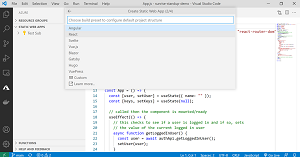 [Click on image for larger view.] Build Presets (source: Microsoft).
Microsoft also announced a new preview Azure Static Web Apps CLI as a local development tool that replicates the cloud production environment, serving as a mocked hosting platform to work with authentication, custom routing and authorization rules.
So the full range of features of the service highlighted by Microsoft includes:
- Globally distributed content for production apps
- Tailored CI/CD workflows from code to cloud
- Auto-provisioned preview environments
- Custom domain configuration and free SSL certificates
- Built-in access to a variety of authentication providers
- Route-based authorization
- Custom routing
- Integration with serverless APIs powered by Azure Functions
- A custom Visual Studio Code developer extension
- A feature-rich CLI for local development
Pricing options include a free offering for hobbies or personal projects, while the standard general-purpose plan costs $9 per app per month along with bandwidth overage fees.
"Azure Static Web Apps is a great option to accelerate the development and time to market for full-stack modern web apps using commonly built libraries and frameworks like Angular, React, Svelte, Vue, or Blazor," said Daria Grigoriu, Principal PM Manager, Azure Static Web Apps, in a May 12 announcement.
One reader agreed in a comment: "This is great news! Azure Static Web Apps are simple way to get web content up and live with Azure Functions backends. You commit to GitHub and GitHub Actions once configured auto builds and deploys the site to Azure :)"
You can learn more with Azure Static Web Apps documentation.
About the Author
David Ramel is an editor and writer at Converge 360.