News
Hot Reload Now Works with C++ Apps, with Blazor WebAssembly Support On Tap
Microsoft is touting a raft of improvements to .NET Hot Reload functionality introduced in Visual Studio 2022 Preview 2.
Hot Reload, a much-requested and long-awaited feature for editing code at runtime, was introduced as a new experience in May in Visual Studio 2019 v16.11 Preview 1 and through the dotnet watch command-line tooling in .NET 6 (Preview 4).
More recently, with the release of Visual Studio 2022 Preview 2, Hot Reload was extended to native C++ apps along with managed .NET apps. "With Hot Reload, you can edit C++ or .NET projects while your application is running," Microsoft said. "In many cases, you can apply those code changes without pausing your app."
The new functionality was explained in a July 29 blog post in which the company dives deeper into the brand-new Hot Reload experience.
"With Hot Reload our goal is to save you as many app restarts between edits as possible, making you more productive by reducing the time you spend building/restarting as you continue to build your app. We try to achieve this goal by making it possible for you to edit your applications code files and, in many cases, apply those code changes immediately without having to do things such as pause the apps execution or restarting," said Dmitry Lyalin, senior program manager, .NET Multi-platform App UI (MAUI), XAML Tooling & Hot Reload.
"This brand-new Hot Reload technology for code files also continues to work side-by-side with XAML Hot Reload, making both XAML and .NET Hot Reload available for those applications that use XAML for UI. Hot Reload also works alongside existing debugger capabilities you might be used to such as breakpoints, 'edit and continue '(EnC) for modify running code at a breakpoint and other features."
Highlights of the new experience include:
-
Initial support for editing Razor pages in ASP.NET web applications
-
Support for Hot Reloading C++ apps during the debugger experience
-
The ability to use .NET Hot Reload without the debugger when launching an app with CTRL-F5
-
Support for more types of edits
While Hot Reload works with Blazor Server and Razor pages, it doesn't yet work with the client-side Blazor component, Blazor WebAssembly (or Blazor Wasm), though such support is on tap along with support for .NET MAUI apps (the evolution of Xamarin.Forms that adds desktop app development).
A separate blog post is devoted entirely to Hot Reload support for C++ applications. There, it's powered by Edit and Continue (see documentation), a new way of editing code while debugging that lets developers apply code changes without stopping at a breakpoint or restarting an app. While it only works with MSBuild C++ projects right now, an upcoming preview will introduce support for CMake projects.
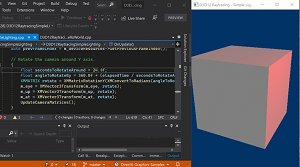 [Click on image for larger, animated GIF view.] C++ Hot Reload in Animated Action (source: Microsoft).
Other things that C++ developers should note include:
-
Developers can edit any codebase compiled by MSVC toolset, as long as they use the /ZI compiler switch
-
Developers can edit both exe and DLL projects
-
Hot Reload injects changes into the app dynamically and won't trigger a full rebuild of the app
-
Hot Reload functions the same as Edit & Continue but does not require break mode debugging -- developers no longer need to set a break point
-
If developers need the program stopped before making changes, they should use Edit and Continue; otherwise, Hot Reload will provide the best experience
-
C++ Hot Reload only works when using the Visual Studio debugger, and while .NET Hot Reload is coming to CTRL-F5 and CLI experiences, this is not currently planned for C++ apps
Going forward, Microsoft plans:
Support for Blazor web apps in more scenarios, such as support for Blazor Wasm and hybrid .NET MAUI desktop apps
Support for editing CSS files during Hot Reload, enabling developers to both change code-behind and the CSS files of an app during the same session with CSS changes reflecting in real-time
Supporting .NET MAUI iOS and Android scenarios for Hot Reloading mobile apps through the debugger (F5), with Microsoft noting that supporting non-debugger scenarios such as CTRL-F5 and CLI are currently below the cutline for what the team can deliver in .NET 6 timeframe
Additional improvements to the user experience in Visual Studio 2022, this includes an improved rude edit dialog, a new settings panel, an option to enable hot reload to apply changes "on file save" and more
Microsoft is seeking developer feedback on C++ Hot Reload via a survey.
About the Author
David Ramel is an editor and writer at Converge 360.