News
GitHub Ditches macOS for Codespaces, Now Offered for Team/Enterprise Testing
GitHub has ditched its local macOS development model in favor of its new Codespaces cloud-hosted service, which is now available for try-out to customers on Team and Enterprise cloud plans.
GitHub Codespaces provides developer environments based on the open source-based, cross-platform Visual Studio Code editor from Microsoft (which also owns GitHub). These environments, running on virtual machines in the cloud, can be spun up with different amounts of storage, compute and memory resources. Codespaces debuted in May 2020 as a limited beta for individuals, but GitHub earlier this month said it can now be put through its paces by Team and Enterprise plan customers.
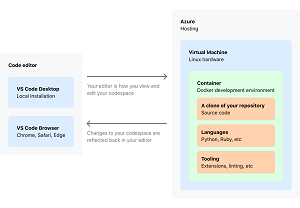 [Click on image for larger view.] GitHub Codespaces (source: GitHub).
Codespaces is also now the default development environment at GitHub, being used by internal developers for most of the work that previously was primarily done on local Mac computers over the 14-year history of the platform.
"Over the past months, we've left our macOS model behind and moved to Codespaces for the majority of GitHub.com development," the organization said in a blog post earlier this month. "This has been a fundamental shift for our day-to-day development flow. As a result, the Codespaces product is stronger and we're well-positioned for the future of GitHub.com development."
Despite years of improving the local development scheme for GitHub development -- with a heavy reliance on scripting and command lines -- the organization said that model was still "brittle" and fraught with challenges. For example, little changes in a setup could cause things to mysteriously break, resulting in time-consuming recovery operations. This was so common the engineering team tweaked a bootstrap script to provide an option to just try to restore things to a working state.
The team is now trying to speed up the Codespaces environment spin-up process, which could take more than 45 minutes previously but which has been cut down to five minutes, with more work to be done to reach GitHub's goal of achieving "instant-on, access-from-anywhere" functionality.
The process was quickened with several techniques, including "shallow" clones of the github/github repo, caching supporting software and services, ahead-of-time repo bootstrapping/cloning, and other app and service-level optimizations.
"The engineering investment we've made in prebuilds has returned its value many times over: we can now create reliable, preconfigured codespaces, primed and ready for GitHub.com development in 10 seconds," GitHub said. "New hires can go from zero to a functioning development environment in less time than it takes to install Slack. Engineers can spin off new codespaces for parallel workstreams with no overhead. When an environment falls apart -- maybe it's too far behind, or the test data broke something -- our engineers can quickly create a new environment and move on with their day."
GitHub documentation says Codespaces is free to use for all organizations on a GitHub Team or GitHub Enterprise Cloud plan until Sept. 10, 2021. After that, developers must set a spending limit to continue to use Codespaces.
About the Author
David Ramel is an editor and writer at Converge 360.