News
Google's Flutter Now Does Windows Apps
Support for coding Windows apps has arrived with Flutter 2.10, Google's open source framework for building natively compiled, multi-platform applications from a single codebase.
"Today, we're thrilled to announce the full availability of support for Windows apps for Flutter in stable builds," said a Feb. 3 announcement by Tim Sneath, a former principal lead program manager for Visual Studio who in 2017 left Microsoft to join the Flutter team, aiming a few negative parting shots at Microsoft. Sneath is now the product manager for Flutter and its associated programming language, Dart.
Apparently the relationship is on good terms now, as Google solicited comment from Microsoft on the new Windows support, for which Microsoft's Kevin Gallo said: "We're delighted to see Flutter adding support for creating Windows apps. Windows is an open platform, and we welcome all developers. We're excited to see Flutter developers bring their experiences to Windows and also publish to the Microsoft Store. Flutter support for Windows is a big step for the community, and we can't wait to see what you'll bring to Windows!"
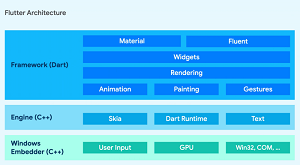 [Click on image for larger view.] On Windows, Flutter uses exactly the same Dart code, but takes advantage of native Windows APIs. (source: Google).
Sneath specifically thanked the Fluent design team for contributing iconography for Flutter apps on Windows, among several Microsoft teams that reportedly helped out.
While Flutter was originally aimed at the mobile dev space, its vision for desktop (and web) apps started a couple years ago, said Sneath, who added that the team tailored Flutter for Windows while bringing it to Windows.
"Your app can use every part of the Flutter framework, and on Windows, it can also talk to the Win32, COM, and Windows Runtime APIs either directly through Dart's C interop layer, or using a platform plugin written in C++," Sneath said. "We've also adapted a number of common plugins to include Windows support, including camera, file_picker, and shared_preferences. More importantly, the community has already added Windows support for a broad array of other packages, covering everything from Windows taskbar integration to serial port access."
While the Windows desktop app support is new in Flutter 2.10, it already had supported Universal Windows Platform (UWP) desktop applications, as Visual Studio Magazine explained in the May 2021 article "Flutter Update Furthers UWP Desktop Support."
Also, Microsoft's Surface Duo dev team courted Flutter developers in March 2021, as explained in the article "Microsoft's Surface Duo Dev Team Courts Flutter Coders."
There's also a Fluter/Dart Code extension for Visual Studio Code in that code editor's marketplace, which provides Flutter support and debugger. It has been installed more than 3.8 million times.
In the Visual Studio IDE space, though, there doesn't seem to be much traction. Flutter desktop guidance says Visual Studio 2022 is required for Windows desktop development, while otherwise it suggests as an optional requirement "An IDE that supports Flutter. You can install Android Studio, IntelliJ IDEA, or Visual Studio Code and install the Flutter and Dart plugins to enable language support and tools for refactoring, running, debugging, and reloading your desktop app within an editor."
That Flutter desktop guidance also says: "When installing Visual Studio you need the 'Desktop development with C++' workload installed for building win, including all of its default components."
There's also a helpful tip: "Note: Visual Studio is different than Visual Studio Code."
About the Author
David Ramel is an editor and writer at Converge 360.