News
What's New in VS Code 1.66 (March 2022 Update)
Here's what's new in the March 2022 update of Visual Studio Code (v1.66), as highlighted by the dev team:
- Local history - Keep track of local file changes independent of source control: Developers can now see the local history of files in the Timeline view and drill down to see the contents of a file at the time the entry was made, also sometimes seeing associated semantic information like refactoring indications. They can also compare changes to other entries, restore contents and delete/rename the entry thanks to new settings and global commands.
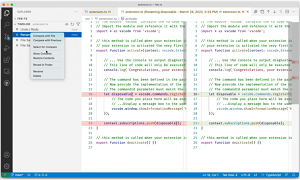 [Click on image for larger, animated GIF view.] Local History in Action (source: Microsoft).
- Settings editor language filter - Displays available language-specific settings: Language-specific settings, also known as language overrides, can be seen and edited with a command in the settings editor search box, which brings up all the settings associated with language specified in the search.
- Terminal find improvements - Matches are highlighted in the terminal panel and scroll bar: Now, just like searching a document, all instances of the search term will be highlighted in a terminal search, along with the currently selected match that has its own customizable highlight.
- Built-in CSS/LESS/SCSS formatters - Code formatting for CSS, LESS, and SCSS: A formatter has been added to the built-in CSS extension, implemented by the JS Beautify library and coming settings to enable/disable the default CSS formatter, separate rulesets and selectors, and more.
- JavaScript heap profiles - Collect and view JS memory allocations while debugging: Coders can now collect and visualize heap profiles (where and how much memory is allocated over time) in the JavaScript debugger.
- VS Code for the Web - Drag and drop files and folders into vscode.dev: The online versions of VS Code (vscode.dev or insiders.vscode.dev) now let users drag and drop local files and folders into a browser window if the browser supports the web file system access API to access the contents. They can be dropped over the editor area or the File Explorer.
- Remote - SSH support for Mac - Connect via SSH to Apple Silicon/M1/ARM64 machines: In the continuing effort to improve Remote Development extensions, which allow for complete development environments in containers, remote machines or the Windows Subsystem for Linux (WSL), the team announced:
- "Open in Remote Container" badge - Direct users of your repo to reopen in a custom development container.
- The Remote - SSH extension can now connect to remote Apple Silicon/M1/ARM64 machines.
- New R language topic - Learn how to use R for data science in VS Code: This refers to the new R in Visual Studio Code topic describing R programming language support (R is commonly associated with statistics-related libraries) in VS Code with the R extension.
About the Author
David Ramel is an editor and writer at Converge 360.