News
Microsoft Touts IntelliJ IDE from JetBrains for Azure Development
It's well-known that Microsoft touts Java for Azure cloud development with its Visual Studio IDE and Visual Studio Code editor, but it also supports developers who want to work in other tools, including the IntelliJ IDE from JetBrains.
That support dates back some seven years to when the company announced a preview of the Visual Studio Team Foundation Plugin for IntelliJ that works with IntelliJ IDEA and Android Studio.
After various other IntelliJ initiatives over the years, said support took another step forward today (April 29) with the debut of a new blog series about Microsoft's Azure Toolkit for IntelliJ, which is available in the JetBrains Marketplace.
"Welcome to our new blog series for Azure Toolkit for IntelliJ," said Jialuo Gan, a program manager in Microsoft's Developer Division. "Azure Toolkit for IntelliJ is a plugin that allows you to easily create, develop, configure, test, and deploy Java applications to Azure. Our goal of this blog series is to keep you posted on the latest product updates, features and other exciting news."
The marketplace description of the tool reads:
"The plugin allows Java developers to easily develop, configure, test, and deploy highly available and scalable Java web apps. It also supports Azure Synapse data engineers, Azure HDInsight developers and Apache Spark on SQL Server users to create, test and submit Apache Spark/Hadoop jobs to Azure from IntelliJ on all supported platforms.
- Azure Web App Workflow: Run your web applications on Azure Web App and view logs.
- Azure Functions Workflow: Scaffold, run, debug your Functions App locally and deploy it on Azure.
- Azure Spring Apps Workflow: Run your Spring microservices applications on Azure Spring Apps and view logs.
- Azure Container Workflow: You can dockerize and run your web application on Azure Web App (Linux) via Azure Container Registry.
- Azure Explorer: View and manage your cloud resources on Azure with embedded Azure Explorer.
- Azure Resource Management template: Create and update your Azure resource deployments with ARM template support.
- Azure Synapse: List workspaces and Apache Spark Pools, compose an Apache Spark project, author and submit Apache Spark jobs to Azure Synapse Spark pools.
- Azure HDInsight: Create an Apache Spark project, author and submit Apache Spark jobs to HDInsight cluster; Monitor and debug Apache Spark jobs easily; Support HDInsight ESP cluster MFA Authentication.
- SQL Server Big Data Cluster: Link to SQL Server Big Data Cluster; Create an Apache Spark project, author and submit Apache Spark jobs to cluster; Monitor and debug Apache Spark jobs easily.
The inaugural post of the new blog series focuses on the roadmap of future development initiatives, which Microsoft illustrated with this graphic:
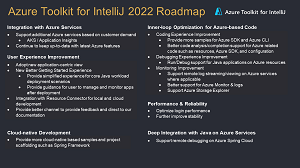 [Click on image for larger view.] Azure Toolkit for IntelliJ Roadmap (source: Microsoft).
Microsoft also highlighted new features and functionality for the toolkit in its latest release that pertain to roadmap items including the very first one listed, integration with Azure services -- specifically Azure Storage Explorer. "It's common for some developers to navigate between IntelliJ IDEA and Azure Storage Explorer during development cycle, therefore, we have now supported the interaction between them," Gan said. "In our latest update, we have supported the action to open local Azure Storage Explorer from our toolkit. You could simply right click the node and find the option of 'Open Azure Storage Explorer.'"
Other new stuff highlighted by Gan include:
- Pin Favorite Resources in Azure Explorer: "With the latest release, developers now can pin any resources into the Favorites root node in Azure explorer. To use this feature, simply find the resource and right click to choose 'Mark as favorite' option or use Shortcuts(F11)."
- Trigger Function with IntelliJ Native Http Client: "We have now supported Triggers in Http Functions with IntelliJ Native Http Client Tool when you are using IntelliJ IDEA Ultimate Edition. With this enhancement, developers can manually modify HTTP requests and configure relevant parameters to trigger their Functions."
- Performance Improvement: "The latest updates bring the improvements on the performance of authentication as well. With the recent 3.63.0 Release of Azure Toolkit for IntelliJ, the login performance with Azure CLI has been improved."
In addition to the IntelliJ tool and the aforementioned Android Studio that Microsoft has lauded for its tooling, the company also supports the open source Eclipse IDE, which reportedly was the top IDE for Java coding up until 2016 when IntelliJ took the top spot.
In fact, Microsoft has an Azure Toolkits for Java GitHub repo that houses development for "Azure Toolkit for IntelliJ IDEA" and "Azure Toolkit for Eclipse."
Developers can learn more about the subject of the new blog series in the Azure Toolkit for IntelliJ documentation.
About the Author
David Ramel is an editor and writer at Converge 360.