News
Easier Jupyter Notebook Setup for Python in VS Code Tooling
In the regular monthly update to Python tooling for Visual Studio Code, Microsoft announced an improved setup experience for Jupyter notebooks, along with new inlay type hints for the Pylance language server.
The dev team for Python tooling in VS Code handles the the three most popular extensions in the VS Code Marketplace, with the main
Python tool boasting a whopping 60.1 million installs, followed by
Jupyter (40.8 million) and
Pylance (33.4 million).
The latter, a language server that serves up language-specific "smarts" for IDEs and code editors such as jump-to-definition, find all references and so on, is improved in the July 2022 update by inlay type hints, which add inline information to code to help developers quickly understand the meaning of variables or functions.
The update added hints for two types: variables and returns.
"Return type inlay hints show the return types of functions that don't have an explicit annotation," said Luciana Abud, program manager, in a July 7 announcement. "To enable it, you can set 'python.analysis.inlayHints.functionReturnTypes': true to your user settings (Preferences: Open Settings (JSON) command).
"Similarly, variable type inlay hints show the types of variables that don't have explicit type annotations. You can enable it by setting 'python.analysis.inlayHints.variableType's: true."
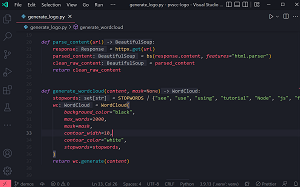 [Click on image for larger view.] Inlay Hints (source: Microsoft).
While the new hints don't change any code, the team is working to provide the ability to add suggested annotations to code via code operations for inlay hints.
The other main highlight of the update affects the Jupyter notebook "getting started" experience, specifically by improving the extension recommendation flow from within a notebook when the Python or Jupyter extensions aren't installed. Now, upon opening a Jupyter notebook in VS Code, developers will see an "install suggested extensions" entry when trying to run a cell or select a kernel. Abud said this greatly reduces the number of steps needed to get the first notebook cell run.
Several other minor updates, tweaks and fixes are detailed in the announcement post.
About the Author
David Ramel is an editor and writer at Converge 360.